

Contract Redlining Best Practices: Review AI Edits in Word
By Anirudh Menon, Viaclause editor
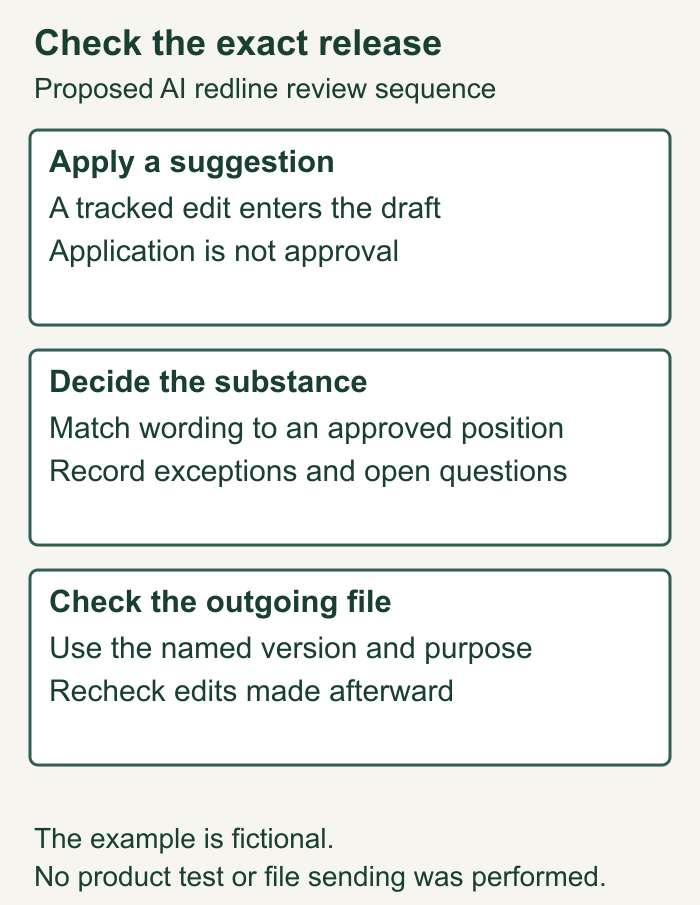
Applying a suggestion, accepting a tracked change and authorizing a file for sending are separate decisions. Use a worked example and approval record to check each.
AI-generated editorial illustration by Viaclause. People and setting are fictional; this does not depict Harvey staff, customers or a product demonstration.
Review AI redlines in Word by checking each proposed change against the agreement and your approved position, recording who cleared it, and checking the exact file you intend to send. Keep a copy of the incoming draft. Separate applying a suggestion from approving its substance. Decide whether the recipient needs a negotiation redline or an agreed clean copy. A document that looks clean is not evidence that someone approved every change.
Follow the contract redlining guide to connect document comparisons and edits to the complete review process.
Harvey's September 23 Word announcement makes this a timely question for legal operations and procurement teams. The practical task is the same across tools: connect the proposed wording, the human decision and the outgoing file. The workflow below is our proposed control, with a fictional example you can adapt for an internal pilot.
What Harvey announced, and what it does not establish
In its September 23, 2026 announcement, Harvey said custom agents built through Agent Builder can run in the Word add-in. It describes previews, individual application, application with a comment, discarding a suggestion and applying all suggestions. Applied edits enter Word as tracked changes. The announcement excludes custom workflows from this release.
The public release-note index describes text-based custom agents and dates its Word entry September 16. That is distinct from the September 23 announcement date. These are vendor descriptions, not an independent test or a claim that every customer received access on the same day.
For a buyer, the announcement creates a specific review question: after a batch of edits enters the document, can a second reviewer tell which wording was cleared and which still needs a decision?
Keep three decisions separate
| Decision | Question to answer | Record to keep |
|---|---|---|
| Apply a suggestion | Should this proposed wording enter the working document? | Change ID, input version and proposed wording. |
| Approve the substance | Does this wording match the deal, playbook or an authorized exception? | Decision, reason, approver and unresolved dependencies. |
| Approve sending | Is this exact file suitable for this recipient and purpose? | Release filename, redline or clean-copy status, checker and date. |
This record is an internal workflow proposal. A software action does not tell us who has authority under your organization’s approval rules. Set that responsibility before the review: for example, who may approve a payment change, a liability exception or a revised renewal position?
Microsoft's tracked-change instructions explain that No Markup only hides revisions temporarily; removing tracked changes requires accepting or rejecting them. That distinction supports the display risk here. It does not establish whether a contract has been legally accepted.
Start with a known version and a clear review instruction
Save the incoming draft with its source and date. Identify the agreement, schedules and amendments the reviewer should use. Record whether the current Word file already contains someone else's revisions. Keep those distinguishable from the new review rather than treating every visible edit as an AI suggestion.
Write the intended result in plain language. “Check the renewal provision against the approved 30-day position, preserving the notice recipient and delivery method” is more testable than “make this contract favorable.” Identify the document that supports the position and any matter-specific exception.
Harvey says instruction updates carry into the next Word run. Record the instruction version or a permitted snapshot used for the review, plus the run date. Do not assume a later rerun will reproduce the earlier output. This is a reason to retain the decision record, not evidence that the product loses history.
Before supplying documents, check the approved AI upload route and data terms. If a proposed change relies on an email concession, use the email collection guide to preserve the supporting message and attachment rather than relying on a recollection of the negotiation.
Worked example: Apply all followed by No Markup
All wording, people and decisions in this example are fictional. This is not a reported Harvey incident or a product test. A buyer’s approved position is 30 days’ notice before renewal. The incoming draft already says:
Incoming wording:
Either party may prevent renewal by giving written notice
at least 30 days before the current term expires.

Hypothetical suggested wording:
Either party may prevent renewal by giving written notice
at least 90 days before the current term expires.
Suppose a review returns this change alongside a correct company-name correction. An operator applies the whole batch, then selects No Markup. The page now looks tidy. The changed notice period remains in the working document as an unresolved revision, even though the operator is no longer looking at the markup.
The problem is concrete: the hypothetical 90-day wording requires the buyer to act 60 days earlier than its approved 30-day position. That subtraction is not a contractual deadline calculation; the actual deadline also depends on the agreement's term and counting rules. The cosmetic correction gives no reason to approve the separate notice change.
Return to a view that exposes revisions and inspect both changes. Keep the company-name correction if verified. Reject or revise the notice proposal to the approved wording, or obtain a documented exception from the responsible person. Check the notice clause's recipient and delivery method as well as its number of days. Our notice-delivery checklist covers that separate question.
Use an approval record that can show different outcomes within one batch:
| Change and input | Basis and decision | Owner and release check |
|---|---|---|
| C01, draft-v3.docx: correct customer name to Northfield Services LLC. | Matched fictional signed order. Approved for negotiation draft. | Procurement lead Maya Chen, September 27. Checked in release-v4-redline.docx. |
| C02, same input: replace 30-day non-renewal period with 90 days. | Conflicts with fictional approved 30-day position. Proposal rejected; retain 30. No exception approved. | Legal reviewer Alex Rao, September 27. Confirmed release-v4-redline.docx retains 30 and does not contain the rejected 90-day insertion. |
The record ties approval to a file. If someone edits that file afterward, the release check must cover the new version. A comment saying “looks fine” without identifying the wording or version leaves the next reviewer to reconstruct the decision.
Why a human approval field needs evidence
NIST's Generative AI Profile, section 2.7, identifies automation bias and over-reliance as risks in human interaction with generative AI. It is independent, cross-sector guidance. It does not measure Harvey's error rate, test Word redlining or prove how often the fictional mistake above occurs.
Our proposed response is to require a reason and supporting position for material changes. Let reviewers mark a suggestion unresolved, request a revision or escalate it. An approval field that must be ticked merely to finish the task gives them no useful way to record uncertainty.
For a pilot, give a second authorized reviewer the input, the output and the completed record. Ask them to identify the rejected notice change and the exact release file. Record missing information and time spent resolving it. This checks your handoff process; it does not establish product-wide accuracy. Use the AI contract-review testing guide for a separate quality evaluation.
Contract redlining best practices before sending the file
For negotiation, preserve the approved proposals as a redline so the counterparty can review them. Do not accept every revision just to make that file look clean. Remove or rewrite internal comments that are not approved for the recipient, keeping an internal review copy.
Test retained changes and comments with the contract redlining software test before selecting an editing product.
For an agreed clean copy, resolve changes according to the approved decisions and inspect the resulting text. Record that it is the clean version authorized for the next step. Sending approval and signature authority may be different responsibilities within your organization.
For a final difference check, Microsoft's legal-blackline instructions describe comparing two versions in desktop Word for Windows, with results in a third document by default. Retain that default and preserve your originals; choosing an original or revised document as the output changes that selected file. Read prompts about existing tracked changes carefully. A comparison helps locate differences; it cannot decide which party should accept them.
Microsoft also recommends Document Inspector as a final check for revisions, comments and other hidden information. Use it on a release copy under your records process, and inspect the result. Do not remove the negotiation markup you intend to share or destroy the internal record simply to achieve an empty findings list.
Resolve comparison findings without losing the decision trail
Before comparing versions, identify whether either input already has tracked changes. Microsoft's desktop Windows instructions explain that comparison can prompt to accept existing changes and that its result treats original-document changes differently from revised-document changes. Preserve the incoming and reviewed files, read the prompt and record the inputs and settings. The comparison result is a review aid, not a replacement for the earlier decisions.
Do not use one operation to answer three questions. The agent's proposed wording, the reviewer's decision and the text in the released file need a traceable connection. A legitimate new change after the check still produces a new version to assess. A matching filename alone is weak evidence if someone can overwrite its contents.
Filled release record for the existing fictional example
SYNTHETIC RELEASE RECORD R01
Input: draft-v3.docx, retained as received.
Purpose: negotiation redline, not an agreed execution copy.
C01: Northfield Services LLC name correction approved.
C02: proposed 90-day notice rejected; approved position is 30.
Release: release-v4-redline.docx from the earlier approval table.
Check: C01 is included; rejected 90-day wording is absent.
Negotiation proposals: retain intended visible redline changes.
Internal comments: review for the intended recipient.
Decision owners: the fictional named reviewers in the table.
Unresolved matter: no new exception or final deal acceptance.
Next step: release only this reviewed negotiation file.
Later edits: identify the new version and repeat affected checks.
Test status: constructed example, not an executed Word test.
Sending status: no actual file was sent.
The example demonstrates a review record, not a certification that a file existed. In a real matter, record the actual checks and any failure before marking release authorized. If the notice wording cannot be verified against the approved position, leave it unresolved and route it to the responsible approver rather than borrowing approval from the harmless name correction.
Release-review checklist
- Preserve the incoming packet and identify existing revisions.
- Record the approved playbook or matter-specific position.
- Identify the agent instruction used for this run.
- Account for each material proposed change and dependency.
- Separate approved, rejected, revised and unresolved outcomes.
- Confirm who can authorize exceptions and sending.
- Choose negotiation redline or agreed clean-copy purpose.
- Compare the intended release against the identified baseline.
- Record comparison settings and handling of existing changes.
- Check rejected wording and recipient-specific comments.
- Retain the exact outgoing version and its release evidence.
- Recheck subsequent edits rather than relying on an earlier approval.
Copyable release check
Agreement and intended recipient:
Purpose: negotiation redline / agreed clean copy / other
Incoming filename and source date:
Agent, instruction version and run date:
Approved position and supporting document:

Change ID | exact proposed wording | decision | reason
Approver | decision date | unresolved dependency

Outgoing filename and version:
Material edits checked against approval record:
Rejected suggestions absent from outgoing wording:
Comments and metadata reviewed for this recipient:
Comparison baseline, settings and result:
Release checker and date:
Open issues that prevent sending:
Actual file sent and sending record:
Frequently asked questions
Does applying an AI suggestion approve the contract?
No. In the workflow Harvey describes, applying a suggestion inserts a tracked edit. Your organization must separately decide whether to approve that wording and authorize the outgoing document.
Does No Markup remove tracked changes?
No. Microsoft's documentation says it temporarily hides them. Use the appropriate review controls to resolve changes when creating a clean copy; keep intended proposals visible in a negotiation redline.
Can I use Apply all?
Harvey describes bulk application. Our recommendation is to account for every material change afterward and require release review. Bulk application should not count as evidence that all the proposals match the approved deal.
Should I accept all contract redlines before sending a Word file?
First identify the purpose. A negotiation redline should retain the proposals you want the other side to evaluate. An agreed clean copy should reflect the approved final wording. Keep the internal review history separately.
What if the agent's instructions change during the review?
Record which instructions governed each run and recheck new output. Tie the approval to the wording and file reviewed, rather than assuming an earlier approval covers a later result.
Can document comparison prove every edit was authorized?
No. It locates differences under the selected comparison settings. Check those differences against the decision record and keep unresolved wording out of a file authorized as agreed.
What if a colleague edits the checked file afterward?
Identify the new version and repeat the affected review and release check. An approval naming the earlier file does not establish what the later file contains.
Sources
- Harvey: Run Custom Harvey Agents Directly in Word, September 23, 2026. Vendor description of supported agents, preview, application, tracked edits and instruction updates; not an independent performance evaluation.
- Harvey public release-note index, inspected September 27, 2026. September 16 entry describes text-based agents. The index is not evidence of universal rollout timing.
- Microsoft: Accept or reject tracked changes in Word, inspected September 27 and October 7, 2026. No Markup, resolving revisions and Document Inspector.
- Microsoft: Compare document differences using the legal blackline option, inspected September 27 and October 7, 2026. Desktop Windows workflow and output-file cautions.
- NIST AI 600-1: Generative Artificial Intelligence Profile, July 2024, section 2.7. Independent guidance on human-AI interaction risks, not a contract-tool benchmark.