

Recover Deleted Email Evidence: Where to Look First
By Anirudh Menon, Viaclause editor
Often yes, for a limited time. Check Deleted Items or Trash now, then investigate administrator recovery and retained copies.
AI-generated editorial illustration by Viaclause. People and setting are fictional; this is not a photograph of an actual recovery.
It may be possible while a recoverable or retained copy still exists. To recover deleted email evidence, check Outlook's Deleted Items or Gmail's Trash now. If the message is absent, ask your administrator to check retained copies today. “Deleted” does not always mean purged, but recovery is not guaranteed.
- Microsoft 365: look in Deleted Items, then Recoverable Items. Exchange Online's latter window is 14 days by default, configurable up to 30. Ask about retention or litigation hold.
- Gmail: check Trash within 30 days, unless emptied earlier. For a work account, ask about admin recovery and Vault copies covered by retention or a hold.
If the other side deleted it: first look for your own received or sent copy. Their mailbox requires a request through the appropriate authorized contact or legal process, not access through your account.
Where to look first, and which clock matters
| Situation | First action | Window or condition |
|---|---|---|
| Microsoft 365 message in Deleted Items | Select it and move or restore it to a mail folder. | No universal 14-day clock for this visible folder. Account policy matters. Follow Microsoft's version-specific recovery steps. |
| Removed from Deleted Items, or Shift+Delete used | Use Recover Deleted Items or Recover items deleted from this folder, if available. | The Exchange Online deleted-item window starts at that removal: default 14 days, configurable up to 30. Confirm the actual mailbox setting. |
| Microsoft 365 user recovery finds nothing | Escalate to the mailbox administrator. | Admin recovery may find purged items still retained. Single-item recovery must have been enabled before deletion for that route. |
| Gmail message in Trash | Open Trash, select the message, choose Move to. | Up to 30 days after deletion; Delete forever ends the user's Trash recovery earlier. |
| Google Workspace message removed from Trash | Ask the administrator to check Restore data. | Admin restoration covers permanent deletions within the past 25 days. Count from permanent deletion, not the message's sent date. Do not assume everyone gets 55 days after their first Delete click. |
| Retained organizational copy | Ask the authorized retention or eDiscovery owner to search. | Microsoft retention and holds can preserve items beyond the ordinary deletion route. Vault retention rules or holds may preserve Gmail data. Verify coverage and dates. |
These Microsoft timing figures are for Exchange Online mailboxes, not every account opened in Outlook. Outlook.com and other mail providers have their own rules. The support page covers several products; choose the section for your account and client.
Vault has a separate clock. Google's current Vault glossary describes an additional 30-day preservation period for messages removed from Trash. Applicable retention rules or holds can keep data longer. That is distinct from the 25-day Admin-console restore window. Retained messages can be searched and exported; Vault does not directly restore them to the user's Gmail account. Ask whether a copy exists, not simply whether the inbox can be put back.
What usually cannot be restored
- A Gmail message permanently removed from the user's Trash cannot be recovered through that user's Trash controls. Google also says deleted drafts cannot be recovered from Trash. Workspace administrator and retained-copy routes are separate.
- An expired Workspace restore window cannot be extended by changing the date range in the restore form. Google's restoration exclusions also include deleted drafts, spam messages and deleted labels. An exportable retained message does not necessarily recreate the old mailbox organization.
- Data already purged from Google's production systems is no longer available to Vault. A new hold cannot recreate a nonexistent copy.
- Exchange items no longer retained may be unavailable through normal recovery. The Recoverable Items documentation describes deletion after retention expires, with hold and quota conditions. A permanently deleted custom folder can be unrecoverable even when some messages from it remain recoverable.
Do not turn an unsuccessful search into “all copies are gone.” Our proposed next check is whether a pre-existing backup, earlier export, recipient copy or separate authorized archive contains the message. Record which copy was found and where. A quoted reply is not the same thing as recovering the original message with its attachments. Do not promise that generic recovery software can retrieve a server-side message that no longer exists.
Decision tree for an urgent recovery request
- Identify the account. Record the mailbox address, provider, work or personal account, and who is authorized to administer it. “I use Outlook” is not enough.
- Check the visible folders. Search for the specific message in Deleted Items or Trash. Also check whether it was moved rather than deleted. Restore a found message, then verify its contents.
- Identify the deletion event. Was it moved to Trash, removed from Trash, removed from Deleted Items, or purged from recovery? Record the date, time zone and how you know. If unknown, label it unknown and escalate now.
- Use the account's next recovery route. For Exchange Online, try the recovery control and contact the administrator if absent. For Workspace, request the administrator's restore check and a separate retained-copy search.
- Check retention coverage and other copies. Ask which mailbox, dates and message types the policy or hold covered, when it applied, and whether a backup actually predates loss. Do not change retention settings experimentally.
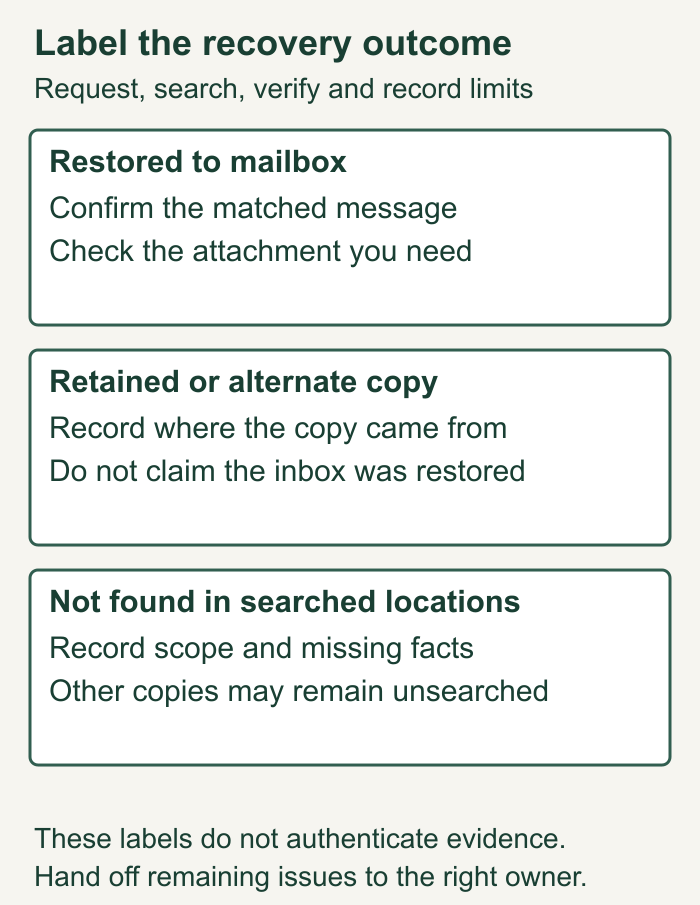
- Classify the result. Use “restored to mailbox,” “retained copy exported,” “alternate copy obtained,” or “not found in the routes searched.” Those statements describe different outcomes.
For a dispute, alert your organization's legal and IT contacts together so remaining relevant material can be addressed while recovery is investigated. This workflow does not determine anyone's legal preservation duties or whether a missing message proves misconduct.
Worked example: the discovery date does not start the clock
Synthetic example: a procurement employee deletes a vendor email on September 1, 2026 at 10:00 UTC. It sits in Deleted Items until the employee empties that folder on September 4 at 10:00 UTC. The employee notices the loss on September 12 at 10:00 UTC. Assume an Exchange Online mailbox with a confirmed 14-day deleted-item retention setting, no subsequent user purge, no applicable hold and no quota-related early removal.
There are eight elapsed days between September 4 and September 12. The relevant ordinary recovery clock began on September 4, not when the email was sent, first deleted, or noticed missing. The item is still inside the assumed period. Fourteen elapsed days from the removal timestamp reaches September 18 at 10:00 UTC. Treat that as a calculation under the assumptions, not a promise that a message will remain available until a particular last-minute click. Microsoft's retention rule supplies the period; the dates are invented.
Act on September 12: open Recover Deleted Items, locate the vendor email and restore it. If it is absent, ask the administrator to investigate immediately. In this exercise, the employee finds it at 10:15 and confirms the expected PDF attachment. If the first attempt instead occurred September 20, 16 days would have elapsed: do not assume ordinary recovery still works. Investigate retained or alternate copies without reporting recovery as certain.
| Time, UTC | Known fact or action | Evidence and status |
|---|---|---|
| September 12, 10:00 | Employee reports the missing vendor message; September 4 removal time confirmed for the exercise. | Record both the report time and removal time. Do not substitute one for the other. |
| September 12, 10:05 | IT confirms mailbox type and 14-day setting; eight days elapsed. | Configuration confirmation attached to the request. |
| September 12, 10:15 | Employee restores the matched message. | Sender, subject, original message date and attachment checked; status: restored to mailbox. |
| September 12, 10:25 | Recovery result handed to the preservation owner. | Recovered message and recovery log retained; collection follows the preservation guide linked below. |
If the other party deleted the email
Start with the copy you are authorized to access: your own inbox, sent mail and organizational records. Write down exactly what is missing. “Their employee says they deleted it” does not establish that your copy, a recipient's copy or a retained copy is gone.
For material held by another organization, give your legal contact the sender, recipient, approximate date, subject, attachment and reason it matters. Ask them to address preservation and an appropriate request for the material. Do not log into another person's account or treat a deletion allegation as proof of destruction. This article offers recovery triage, not an opinion on disclosure obligations or sanctions.
Copyable request to your authorized administrator
Subject: Urgent deleted-email recovery check
Mailbox and account type:
Authorized requester and contact:
Message sender, recipient, subject and approximate sent date:
Expected attachment or other identifying detail:
First deletion date/time/time zone, if known:
Removal from Trash or Deleted Items, if known:
How those dates were established:
Loss noticed at:
Recovery routes already checked and results:

Please confirm the applicable deleted-item retention setting,
whether relevant retention or hold coverage exists, and whether
an authorized restore, retained export or backup retrieval is possible.
Please record the search scope, action time and outcome separately.
Preserve remaining relevant material through the appropriate process.

Owner and next update time:
Result: restored / retained export / alternate copy / not found
Unsearched locations, missing facts and follow-up:
Once a message is recovered, use our email-evidence collection and preservation guide for native exports, records and handling. This article stops at recovery and the handoff; a recovered message is not automatically authenticated evidence or a complete conversation.
Record which recovery outcome actually happened
Recovery work can succeed without putting a message back into the inbox. Keep the result specific so the next person does not assume the entire account or conversation was restored.
ALTERNATIVE OUTCOME: SYNTHETIC RETAINED COPY
Request: locate the vendor message identified in the request log.
Mailbox restoration: not reported as successful.
Retention search: authorized owner finds a matching retained copy in the exercise.
Result label: retained copy exported; not restored to mailbox.
Match check: sender, recipients, original message date, subject and expected attachment reviewed.
Handoff: copy and search/result record given to the preservation owner.
Limits: no claim the whole conversation, every attachment or all locations were searched.
Open action: check the requested attachment and any related messages; record unresolved gaps.
Collection: follow the authorized evidence-handling process; this record does not authenticate the copy or decide admissibility.
This alternative is independent of the successful mailbox restoration in the earlier example. Do not combine their outcomes into a supposed real recovery test. If the owner instead finds only a quoted reply, record “alternate copy obtained” and say what original material is still missing.
Before closing the request: a recovery checklist
- Record the actual provider and account type, not just the mail application.
- Keep first deletion, removal from the visible deleted folder and discovery timestamps separate, with time zone and evidence or “unknown.”
- Confirm the applicable configuration and authorized recovery route; do not treat default periods as proof of the mailbox’s setting.
- Record search criteria, folders or retention scope and who performed the check. Keep unsearched locations visible.
- Verify the identity and contents of any recovered message, including the attachment needed for the business question.
- Use the specific outcome label: restored, retained export, alternate copy or not found within the recorded search.
- Assign the preservation handoff and unresolved items to named authorized roles. The contract administration handover guide helps record those responsibilities.
- Keep the resulting evidence linked to the right agreement record. The contract repository guide addresses retrieval and document relationships after collection.
Frequently asked questions
Can permanently deleted emails still be recovered?
Sometimes. The label may mean the message left a user's visible folder while an administrator or retention system still has it. Identify the account and deletion stage. Actual purge with no remaining retained or alternate copy is a different situation.
Does a litigation hold recover messages already gone?
A hold preserves covered material that still exists; do not treat it as a recovery machine. Ask the administrator to confirm what remained and when the hold applied. Microsoft describes its preservation behavior in the Recoverable Items hold documentation.
Do I have the same recovery options in personal Gmail?
No. Workspace administrator restoration and organizational Vault access should not be promised to a personal Gmail user. Begin with the Gmail Trash recovery route and identify any independently retained copy.
Should I wait until I know the exact deletion date?
No. Send the request with the date marked unknown. Give the administrator a useful message description and record what has already been checked. An uncertain clock is a reason to investigate promptly.
Does using Outlook identify the recovery period?
No. Establish whether the account is Exchange Online, Outlook.com or another provider and confirm the relevant setting. The ordinary fourteen-day default discussed here belongs to Exchange Online’s Recoverable Items route, not every visible Deleted Items folder.
Is a Vault export the same as restoring Gmail?
No. Google’s administrator-restoration guide distinguishes exported retained data from direct mailbox restoration. Record the result as a retained copy exported and verify its contents before handing it onward.
Does “not found” prove the other side destroyed the evidence?
No. State the locations and criteria actually searched and the limits of that search. Whether another copy exists or any legal duty was breached requires separate facts and review; this guide does not determine sanctions or disclosure obligations.
Sources
- Microsoft Learn: Exchange Online deleted-item retention, updated May 30, 2024; default and maximum period, triggering events.
- Microsoft Learn: administrator recovery, updated May 30, 2024; permissions and single-item recovery prerequisite.
- Microsoft Learn: Recoverable Items, updated July 13, 2026; retention, holds, purge and folder limits.
- Microsoft Support: recover and restore Outlook items; client-specific controls, not a universal Exchange Online timing rule.
- Google: delete and recover Gmail messages; Trash window and user recovery limits.
- Google Workspace: administrator restoration, updated October 7, 2026; 25-day route, exclusions and distinction from Vault export.
- Google Vault glossary, updated October 7, 2026; preservation period, holds and meaning of purge.