

Aadhaar eSign: Consent, Authentication and Document Checks in India
By Anirudh Menon, Viaclause editor
Understand Aadhaar eSign in India, check amended document exclusions, follow an OTP signing example, and retain the signed file, certificate and evidence.
Aadhaar eSign is an online digital signing service that uses Aadhaar-based authentication to help an individual sign an electronic document through a signing application and an eSign service provider. It involves certificate issuance and cryptographic signing, rather than simply placing a picture of a handwritten signature on a PDF. The Controller of Certifying Authorities (CCA) describes the service, its consent stage and the role of licensed certifying authorities in its official eSign overview.
For a contract team, completion means more than receiving an OTP or seeing a signature-shaped mark. Review the document's legal route, obtain the intended person's informed consent, and verify and retain the completed electronic file. These are separate checkpoints.
The worked record below is fictional and was not produced by a live Aadhaar authentication or a test of any provider. The banner is an AI-generated fictional illustration.
Three checks before calling the document complete
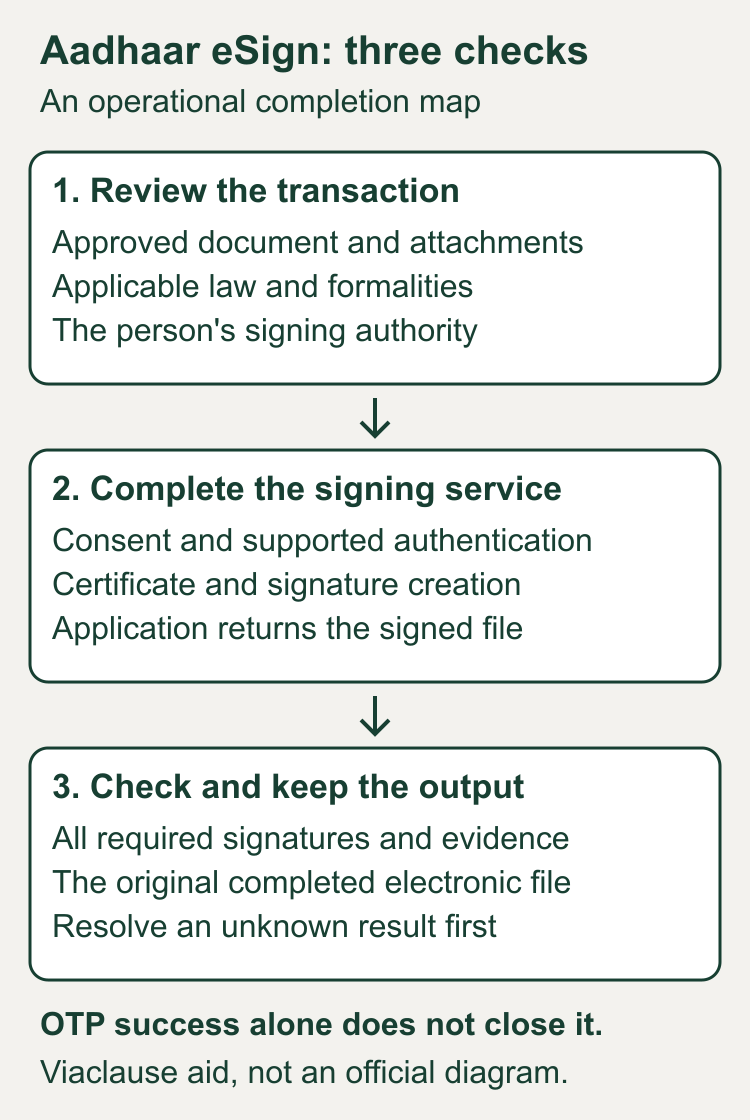
| Checkpoint | Question to answer | Record to keep |
|---|---|---|
| Document and authority | Is this the approved version, is the chosen route suitable, and can this person sign for the named party? | Version approval, authority evidence and the transaction-specific legal review. |
| Consent and signing | Did the intended person consent, authenticate and complete the provider's signing process? | Application reference, consent evidence and the provider result for that transaction. |
| Completed copy | Does the delivered file contain the expected signatures, with validation issues resolved and supporting evidence retrievable? | Original signed file, certificate information, available validation evidence and a linked audit record. |
Use the electronic signature guide for the broader distinction between a signing method and its evidence. The workflow here concerns an Indian Aadhaar route; it does not transfer US electronic signature rules to India.
Who does what in an Aadhaar eSign workflow?
The application service provider (ASP) is the application through which the document is presented. The eSign service provider (ESP) supplies the signing service. A certifying authority (CA) issues the digital signature certificate. Aadhaar authentication and e-KYC supply an identity-related step; they are not the entire document-signing process. These roles and the request-and-response sequence appear in CCA's online eSign API version 2.1 specification.
CCA's 2015 rules introduced the Aadhaar e-KYC technique in the Second Schedule, including electronic consent for the certificate application. The 2019 notification expanded that technique to include other e-KYC services. Aadhaar is therefore one identified route within a wider system.
Check which route your application actually uses. CCA's API directory separately lists online Aadhaar and other services, CA e-KYC account services, and remote-key services, including a September 2026 remote-key update. Do not apply every statement about a one-time online signing key to every product called eSign. Check the current CCA eSign provider directory, then obtain the application's applicable provider and route documentation.
The current CCA e-authentication guidelines, version 1.9 dated September 9, 2026, distinguish short-validity, one-use signing in sections 2.3 and 2.4 from remote key storage in section 10. The former specifies a certificate validity of no more than 30 minutes; the latter has a separate key lifecycle. A product label does not identify the applicable certificate or retention model.
What the technology helps with, and what still needs review
Online signing can remove printing, physical travel and token distribution from a supported workflow. Authentication and a verifiable digital signature help a team investigate who signed and whether the signed content changed. These are capabilities described by CCA's service overview, not a guarantee of a particular provider's turnaround, savings or fraud prevention.
A valid identity credential does not show that a manager has purchasing authority, that a negotiated clause is lawful, or that every recipient accepts the file. Set those checks before choosing the signing method. Compare the complete document process, including failed attempts and retrieval, rather than counting only the time spent entering an OTP.
A useful procurement question is: “Which application, ESP and CA will appear in our transaction evidence, and how will we retrieve the original signed output if the return to the application fails?” Put the answer in the operating procedure before sending a real agreement.
Is Aadhaar eSign legally valid in India?
The IT Act's section 5 recognizes electronic signatures affixed in the prescribed manner. Section 10A prevents a contract from being treated as unenforceable solely because its formation communications used electronic means. Neither provision turns an unsuitable transaction or defective agreement into a valid one. See India Code's IT Act text, sections 3A, 5 and 10A, read with the applicable notifications linked below.
Indian Contract Act section 10 also requires free consent, competent parties, lawful consideration and a lawful object, and an agreement not expressly declared void. It preserves applicable requirements concerning writing, witnesses and registration. Identity authentication should therefore be checked alongside the agreement and the signer's authority.
Use the amended First Schedule, not an old exclusions list
The India Code compilation linked above displays an older First Schedule. The 2022 notification S.O. 4720(E) changes that schedule. Read the two together:
- It removes item 5, the former exclusion for contracts for sale or conveyance of immovable property or an interest in it.
- It replaces the negotiable-instrument entry. Cheques are excepted; demand promissory notes and bills of exchange have specified regulated-entity conditions.
- It excepts specified powers of attorney empowering an entity regulated by RBI, NHB, SEBI, IRDAI or PFRDA to act for the person executing them. Other powers of attorney are not generally released from the exclusion.
- It does not remove the trust and will entries.
For a property transaction, power of attorney, trust, will or negotiable instrument, stop the routine signing workflow and have counsel check the actual document against the applicable law and notifications. Removing an IT Act schedule exclusion does not itself answer the separate writing, witnessing, stamp-duty, registration or filing questions for the transaction.
Aadhaar eSign and eStamp are different steps
Signing concerns the signature on the record. eStamping concerns stamp-duty payment. For example, StockHolding's Digidoc process describes payment of stamp duty and digital signatures as separate stages. This is a provider workflow example, not a nationwide stamp-duty rule or an endorsement of its legal summaries. Confirm the relevant state, instrument, amount, payment route and any registration requirements separately.
Who can use it, and which route should a business choose?
The person signing is an individual. A company can offer the application or be a party to the contract, but it still needs an identified human signer and separate authority evidence. For the OTP integration below, that person needs access to the mobile number associated with Aadhaar, the verified invitation and the final document. Confirm the application's supported authentication options before inviting someone who cannot use that route.
| Situation | Decision before sending |
|---|---|
| A supplier's approved services agreement | Confirm both signers' authority, the agreed version, applicable formalities and acceptance of the online Aadhaar route. |
| An employee signing an approved letter | Keep employment review and the employer representative's authority separate from identity authentication. Offer a supported alternative when the selected authentication route cannot be used. |
| A filing portal specifies a particular certificate | Check the portal's actual instructions before assuming an Aadhaar OTP output will satisfy them. |
| A property instrument, will, trust or power of attorney | Obtain document-specific legal review before a routine invitation; the amended schedule is only part of the analysis. |
These are workflow choices, not a list of universally eligible documents. CCA's FAQ distinguishes application-based eSign from separately obtained digital signature certificates. Its example use cases do not establish that a particular filing portal currently accepts your output. Other CA e-KYC or remote-key routes also exist; get the applicable documentation instead of treating all methods as Aadhaar OTP.
How to sign: a provider-specific OTP example
Use the application that your counterparty or organization has verified. An Aadhaar card download and signing a business document are different tasks. CCA's eSign FAQ explains that available content for signing depends on what the ASP offers.
As a concrete interface example, Zoho Sign's Aadhaar integration instructions describe selecting Aadhaar eSign, proceeding to the eMudhra page, entering the Aadhaar number or Virtual ID, obtaining an OTP at the associated registered phone number, and completing eSign. They also show how to open the signer's certificate. These are instructions for that integration, not universal screen labels.
- Review the final document first. Check names, party descriptions, scope, attachments and the signature capacity. Record the approved source version. Resolve a wrong clause or missing appendix before starting.
- Confirm the application and provider. Use the verified signing invitation and expected destination. Obtain support through the organization's established channel if the redirection is unexpected.
- Read the consent request. Distinguish consent for identity authentication from consent for certificate issuance and document signing. Do not have another person enter an OTP on the signer's behalf.
- Authenticate through the supported route. Enter sensitive information only in the verified flow. Do not place the OTP, full Aadhaar number or a screenshot containing them in a shared contract folder.
- Finish signing and retrieve the result. Check that the application has returned a completed signed file, rather than assuming the authentication screen ended the process.
- Verify and preserve the output. Check every expected signer and the file's signature information. Retain the original electronic output and its related evidence.
Consent and privacy checks the invitation should support
UIDAI's 2021 authentication regulations, updated through December 15, 2025, require the requesting entity to explain the information shared, its intended uses and viable alternative identification, with local-language information, before obtaining and recording consent. Regulations 5 and 6 address these steps. Regulation 5 also conditions its service-access protection on identification through a viable alternative. Check the actual disclosure and escalation route; a generic acceptance checkbox is not the whole review.
CCA explains that the signature function receives the document hash rather than the whole document. This does not mean nobody sees the PDF: the application may present, process and store it. Ask which organization stores the full document, who can access it, what identity-related evidence is retained, and how users obtain the completed copy. Keep identity handling and document storage in the vendor review as separate questions.
UIDAI's authentication guidance describes OTP and biometric modes and, subject to the Act's provisions, consent before identity collection for authentication. Our instruction to keep secrets out of the shared contract record is a practical handling recommendation, not a complete Aadhaar data-compliance specification.
Worked example: a failed OTP and an uncertain return
All names, references, times and outcomes below are invented. Lotus Design and Cedar Retail approve a six-page services agreement, version 3, with a stated fee of INR 60,000. In this teaching example, their transaction review has recorded the appropriate formalities, and their internal authority records identify Meera Kapoor for Lotus and Vikram Sen for Cedar. Those are scenario assumptions, not findings about a real agreement.
Meera's first attempt, LD-01, ends with a reported expired OTP and no completed signature result. The operator keeps it as a failed attempt and confirms that the document is still the approved version. Meera then starts LD-02 with fresh consent and authentication in the verified application.
On LD-02, the application reports authentication success but times out on return. The signing result is unknown. The operator does not mark the document signed or immediately send another request. The operator correlates LD-02 with the provider response through the supported status or support route. In this fictional outcome, the provider confirms successful signing and the application recovers the original signed output for that same attempt.
Vikram subsequently completes CR-01. The operator retrieves the final file containing both expected signatures and reviews its validation evidence. The team's file-completion status becomes complete only after the two signer records and final output are reconciled.
| Event in the example | Observed status | Next action |
|---|---|---|
| LD-01: expired OTP | Failed attempt; no completed signing result. | Keep the failed reference; use the supported retry flow after checking the version. |
| LD-02: authentication success, return timeout | Unknown signing outcome. | Correlate the existing attempt before requesting another signature. |
| LD-02: output recovered | Meera's signature output retrieved for the same attempt. | Check the file and evidence; wait for the other intended signer. |
| CR-01 and final file reconciled | Both expected signatures present; example validation checks resolved. | Preserve the original output and mark the file-completion check complete. |
This recovery procedure is our operational recommendation. Its actual steps depend on the application's supported functions. CCA's API specification distinguishes success and failure responses and provides transaction and response identifiers for correlation. It does not prescribe this invented application's timeout behavior or promise a particular recovery interface.
A later edit needs its own approval and signing decision
Cedar then requests a change from six deliverables to eight. The operator creates an unsigned amendment draft linked to version 3 and routes it for review. The signed version 3 remains preserved. Nobody overwrites its terms, substitutes a new PDF beneath its signatures, or labels the eight-deliverable draft executed. The parties must decide and complete the appropriate amendment process before the team changes its operative record.
Copyable completed-copy record
Adapt these fields to the actual route and your retention policy. The completion status describes the evidence workflow; it is not a legal opinion. Fictional reference codes below are internal labels, not real provider identifiers. No Aadhaar number, OTP, private key or invented certificate fingerprint appears in the example.
Record: SIG-22, fictional teaching example
Parties: Lotus Design / Cedar Retail
Approved source: services agreement version 3
Source contents: six pages, six deliverables
Fee stated in the source: INR 60,000
Route: online Aadhaar OTP eSign in the example
Application / ESP / CA: actual names required in a real record
Authority: Lotus and Cedar approval records linked
Meera attempt LD-01: expired OTP, failed
Meera attempt LD-02: return timeout, initially unknown
LD-02 reconciliation: same-attempt signed output recovered
Vikram attempt CR-01: completed
Final original file: services-v3-both-signed.pdf
Expected signatures: Meera Kapoor and Vikram Sen
Certificate information: checked against intended signers
Signature validation: example issues resolved and evidence retained
Evidence: consent records, attempt history and provider results linked
Formalities: transaction review recorded in this fictional scenario
File-completion status: complete
Later request: eight deliverables, unsigned amendment draft
Operative record: version 3 preserved pending amendment completion
Owner: Riya Shah, contract operations
Secrets in this shared record: none
Keep the original signed file in a controlled contract repository, with clear links to the underlying evidence and any later amendment. Preserve related signing invitations and correspondence using a documented email evidence collection process.
If the task calls for a certificate rather than the Aadhaar signing workflow described here, consult the Class 3 digital signature certificate guide and check the actual portal and applicant requirements.
How to check the signed document
Open the original output in an appropriate signature-aware viewer. Review the signature information, certificate subject and issuer, trust and validation status, recorded signing information, and any reported changes. Resolve an untrusted certificate, unavailable validation information or a modification warning with the relevant provider and your technical reviewer. A screenshot of a green tick is a useful note at most; keep the electronic file and the evidence needed to reproduce the check.
For longer-lived records, ask whether the chosen response and saved file preserve the information needed for validation outside the original application. CCA's application-integration guidance, version 1.0, section 1.31, specifically notes LTV-enabled eSign responses in PKCS#7 formats. Its broader certificate-validation discussion explains issuer-chain and signing-time evidence, but its token-based integration procedure does not apply wholesale to eSign. Have the provider explain the actual output format and resolve warnings; do not silently change trust settings to make a warning disappear.
The approved source and signed output are separate artifacts: embedding signatures can change the file's bytes. Do not require their whole-file hashes to match. If your team uses hashes for preservation, record each file's own digest, identify what each digest covers, and retain the linkage between the approved content and signed output.
A short certificate validity window does not determine the contract term. Ask how your route preserves signing-time validation evidence. CCA's validation guidance distinguishes certificate status at signing from later expiry. Investigate missing evidence rather than accepting an expired certificate automatically; the chosen eSign response format matters.
Pricing and record retention: ask about the whole workflow
CCA's pricing FAQ says prices vary by volume and usage. Obtain a quote covering signing, application charges and separate stamp payments. Ask about failed-request credits, evidence-export charges and retrieval after the subscription ends.
For the ESP's one-use certificate route, CCA guideline section 2.6 specifies at least seven years for relevant authentication evidence concerning certificate issuance and signature creation. That provider obligation does not establish a universal retention period for every business contract or permit unnecessary identity-data collection. Set the team's document retention, access and deletion rules for the transaction, and confirm how provider evidence can be requested later.
Before-send and after-sign checklist
- Record the document type, applicable jurisdiction, amended schedule review and separate formalities.
- Approve one final source version, with all required attachments included.
- Confirm each person's identity, signing capacity and authority evidence.
- Identify the application, signing route, ESP and CA.
- Explain the consent stage and provide a supported route for questions or failed authentication.
- Track each attempt; reconcile uncertain outcomes before a new request.
- Retrieve every required signature and the final original signed output.
- Resolve validation warnings and preserve the result with the supporting records.
- Restrict access to sensitive evidence; exclude OTPs and unnecessary identity data from the shared index.
- Keep later edits and amendment drafts distinct from the preserved signed record.
Frequently asked questions
How do I eSign my Aadhaar card?
If you mean downloading e-Aadhaar, use UIDAI's service. If you mean using Aadhaar authentication to sign another document, use the verified application offering the applicable eSign route. They are different tasks; do not upload an identity document to an unrelated signing site just because it uses the word Aadhaar.
Is Aadhaar eSign the same as a scanned signature?
No. A scan supplies an image of a mark. Aadhaar eSign involves authentication and a digital signing service. Our wet signature comparison explains the different records produced by ink, scanned and digital methods.
Does a typed /s/ name prove Aadhaar eSign was used?
No. A visible typed name does not identify the signing route. Check the actual electronic signature and transaction evidence. See the conformed signature guide for the separate use of /s/ notation.
What if the OTP fails?
Keep the attempt status and use the verified provider's supported recovery instructions. Do not share the OTP with a colleague or reuse a failed attempt as evidence of signing. If the result is uncertain rather than expressly failed, reconcile that existing transaction first.
Does OTP success prove the whole agreement is enforceable?
No. It is an authentication event. The agreement, prescribed signature route, transaction scope, authority and applicable formalities need their own checks. The legal discussion above explains the narrower role of electronic recognition.
Can every document use Aadhaar eSign?
Do not assume so. Review the amended First Schedule, applicable transaction law and the receiving institution's requirements. CCA's service framework does not provide a universal approval of every document offered by an application.
What should I keep after signing?
Keep the original signed output, approval and authority links, consent and attempt evidence, certificate information, available validation records and a clear completion status. Set retention and access rules for the transaction; this guide does not prescribe a universal retention period.
Can a company sign using Aadhaar eSign?
An identified individual signs through the service. When signing for a company, record capacity and authority separately; Contract Act sections 182, 186 and 188 address agency and authority. Authentication does not itself prove authorization.
Can I use a Virtual ID instead of my Aadhaar number?
UIDAI regulation 4A permits VID for online authentication or e-KYC and prohibits entities from storing it. The Zoho integration above offers a VID input. Confirm your application's supported route; keep VID out of the shared completion record.
Does a 30-minute certificate mean my signed contract expires?
No. CCA's guideline gives that window for the one-use certificate route, not the contract's term. Preserve the original output and signing-time evidence. Remote-key services have separate lifecycle rules; identify the actual route before interpreting certificate dates.
Is Aadhaar eSign free?
The CCA pricing FAQ does not establish a universal price. Check the application's plan and provider quote, including retries, exports and separate stamp-payment charges.
Can I assume an overseas recipient will accept it?
No. This guide addresses the Indian route. Confirm the recipient's requirements and the law governing the transaction and its intended use. Indian signature recognition alone does not settle a foreign filing or enforcement question.
Prepared with AI assistance. The workflow map and completed record are original explanatory aids; they do not report a provider test or a human legal review.
Sources
- CCA: online eSign service overview.
- CCA: online eSign API version 2.1, February 2023.
- G.S.R. 61(E): 2015 electronic authentication rules.
- S.O. 1119(E): 2019 Second Schedule amendment.
- CCA: current API directory, including separate signing routes.
- CCA: eSign service provider directory.
- India Code: IT Act compilation, read with later schedule notifications.
- MeitY: 2022 First Schedule amendment S.O. 4720(E).
- India Code: Indian Contract Act, section 10.
- StockHolding: Digidoc's separate stamp-payment and signing stages.
- CCA: eSign FAQ, service scope and archival questions.
- Zoho Sign: Aadhaar integration and certificate-viewing instructions.
- UIDAI: authentication modes and consent guidance.
- CCA: e-authentication guidelines, version 1.9, September 9, 2026; one-use and remote-key scope.
- UIDAI: Authentication and Offline Verification Regulations 2021, updated through December 15, 2025; regulations 4A, 5 and 6.
- CCA: electronic signature application-integration guidance, version 1.0, October 21, 2022; section 1.31 and validation context.