

Electronic Signature: Meaning, Examples and the Evidence to Keep
By Anirudh Menon, Viaclause editor
Compare typed, drawn, image and digital signatures, understand US legal conditions, and build a complete signing record with a worked example and worksheet.
An electronic signature is an electronic sound, symbol or process that a person uses with the intent to sign and that is attached to, or logically associated with, a particular record. A typed name, a drawn mark, an uploaded signature image or a suitable signing process can be part of electronic signing. The essential question is what the person adopted for this record, not whether the mark looks like ink. This definition follows 15 U.S.C. 7006(5).
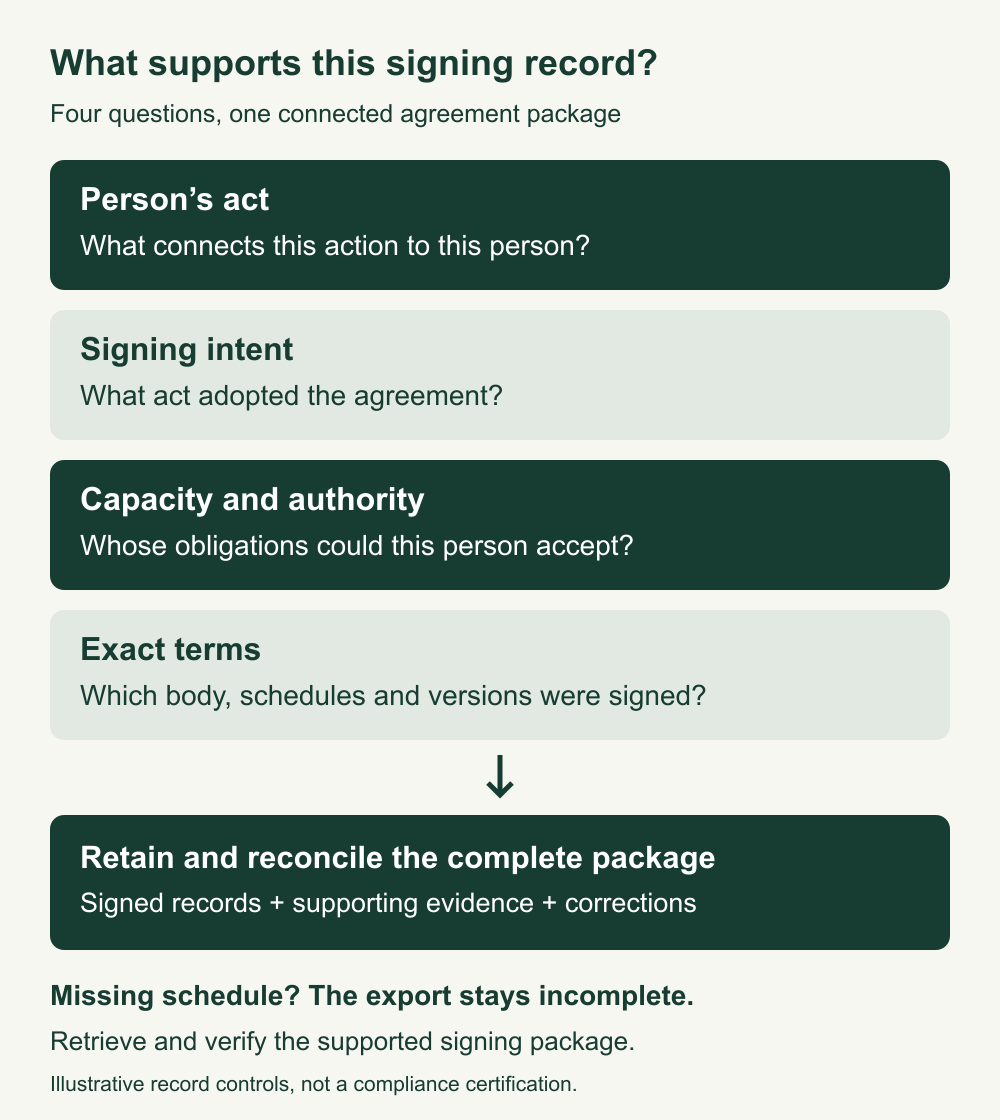
For a business agreement, review four separate matters: the person’s act, signing intent, capacity to act for the named party, and the exact terms associated with the signature. A polished signature image or a “completed” dashboard label cannot answer all four.
This guide is general information for US readers, not legal advice. It explains signing methods and evidence, rather than ranking software. The worked transaction and records are fictional; the banner is an AI-generated illustration.
Four electronic-signature examples and their evidence
These are illustrative methods, not a mandatory four-level legal classification. The supporting records depend on the actual system, configuration and signing process.
| Method | Illustrative signing act | Useful supporting record | What remains to check |
|---|---|---|---|
| Typed name | The signer types their name into a signing field and deliberately submits the agreement. | The displayed terms, submission event, recipient and authentication records, and completed agreement. | A typed email footer or name prefilled by the sender is not itself evidence of this signing act. |
| Drawn mark | The signer draws a mark using a finger, stylus or mouse and adopts it in the signing flow. | The captured mark, named signer, associated agreement and event record. | The drawing’s appearance alone does not explain who used the device. |
| Uploaded image | The signer selects an image of their signature and applies it to the agreement. | The application event and its link to the final terms, alongside the image. | An image stored in a folder is not permission to paste it into another agreement. |
| Certificate-based digital signing | The signer uses a cryptographic signing mechanism for the record. | The signed file and relevant certificate, validation and signing information. | Validation and legal capacity are different inquiries; a valid cryptographic result is not a company authorization record. |
As one implementation example, Adobe’s current signature-input documentation describes typed, drawn and uploaded-image options. It also explains that drawn and image inputs do not automatically capture name text; its signing interface uses a separate name field for the audit report. That is a product-specific detail, not a promise about every tool.
NIST describes a digital signature as a cryptographic mechanism that can support authenticity and integrity when properly implemented. Electronic signature is the broader legal concept; typing a name does not itself add that cryptographic mechanism. Our wet-signature comparison covers paper originals and scans, while the conformed-signature guide explains /s/ representations in a specific court-filing context.
For a Word workflow, the electronic signature in Word guide separates signature images, certificate signing and the managed request process.
How to create an electronic signature for a document
- Check the transaction: identify the applicable law, document type, recipient requirements and any special execution formalities.
- Prepare the complete terms: include the agreed schedules and attachments, with identifiable versions.
- Use an agreed signing method: follow the recipient’s or organization’s appropriate process; type, draw or upload your own mark where the process permits it, or use the required digital-signature method.
- Review and deliberately sign: confirm the party name, capacity and complete terms before taking the action that submits or adopts the signature.
- Retain and reconcile: obtain the completed record and available supporting evidence, checking that the export includes everything signed.
Creating a reusable image is only a preparatory step. The important event is applying or adopting it for the actual record with signing intent. Never apply another person’s stored signature merely because the file is accessible.
If you only received a PDF by email, first establish how the recipient wants it executed and returned. Do not assume a locally inserted image creates the same evidence as a controlled signing workflow. Ask which completed documents and records you will be able to retrieve afterward.
For choosing a signing system, use the electronic-signature software evaluation to compare identity checks, exports and administrative controls.
To see what appearance alone cannot establish, compare the digital versus electronic signature guide and its actual fictional PDF integrity test.
For a document-specific workflow, the Google Docs signing guide separates observed source preparation from documented completion and account eligibility.
For a transaction-level assessment, use the US electronic-signature legality checklist to record legal scope, intent, authority, special procedures and retained evidence.
US legal recognition has conditions
For transactions in or affecting interstate or foreign commerce, 15 U.S.C. 7001(a) prevents denial of legal effect solely because a record or signature is electronic. This removes an electronic-form objection; it does not establish every other element of an enforceable transaction.
In California, Civil Code 1633.7 provides electronic-form recognition. The title’s agreement-to-transact-electronically condition in 1633.5 and scope, exclusions and other substantive law in 1633.3 still matter. Its exclusions do not themselves ban electronic methods permitted by other applicable law. Do not convert a state-specific rule into a claim about every jurisdiction.
Consumer records and special documents
Where law requires information to be provided to a consumer in writing, 7001(c) imposes specific electronic-record consent and disclosure conditions, including access and retention capability. A routine business signing checklist is not a complete consumer-disclosure procedure.
7003 identifies exceptions to section 7001, including specified wills and family-law records, official court documents, and particular notices. An exception calls for the relevant alternative law or procedure, not an automatic conclusion that electronic execution is forbidden. 7001(g) addresses notarization and related official acts: the authorized person’s electronic signature and other required information matter. Check any separate witnessing requirements under the applicable law.
For the general formation questions that remain, start with our contract-elements guide. This article does not give a jurisdiction-by-jurisdiction ruling for wills, property transfers, powers of attorney or regulated records.
Intent, attribution and authority are separate
Intent: What action did the person take to sign these terms? Preserve the relevant signing screen, instructions or other context where appropriately available. An acknowledgement of receipt, an internal approval and execution of an agreement can be different acts.
Attribution: What connects the action to this person? Under California Civil Code 1633.9, attribution depends on the person’s act, which may be shown in different ways, including security procedures. Context and surrounding circumstances affect the record’s significance. An email destination, authentication event and device information may inform an investigation; do not label one field conclusive proof.
Authority: Was the person acting for themselves or a business, and on what basis? California Civil Code 2307 recognizes authority conferred through prior authorization or subsequent ratification. It does not make a company email address a complete authority analysis. Review the relevant delegation, approvals and legal circumstances.
A California case shows why the process record matters
In Garcia v. Stoneledge Furniture LLC (California Court of Appeal, May 17, 2024, pages 12 to 15), the court upheld the denial of petitions to compel arbitration after Garcia disputed signing. The employer’s evidence did not adequately explain how the purported signature was attributable to her. The court considered the explanation of the security process and differences between the disputed agreement and other onboarding records. This was an evidence-specific employment arbitration decision, not a holding that typed signatures are categorically invalid or that one particular audit field is mandatory in every contract.
Worked example: the signature is present, the schedule is missing
The following fictional B2B service transaction uses a made-up signing workflow, not a tested vendor product. Harbor Assembly LLC and Cedar Data Services LLC agree to use electronic signing for service agreement E-28 version 6, including Schedule A version 2. The complete signing package has record identifier E28-V6-SA2.
Mira Chen signs for Harbor and Leon Ortiz signs for Cedar. In the example, the team holds prior company authorization records for both people. The workflow associates their deliberate submissions and authentication events with E28-V6-SA2. Its completion record lists both signing events against that identifier.
The first exported PDF, however, contains the main agreement and signature blocks but omits Schedule A. A coordinator should not mark this export as the complete executed agreement. The visible names do not establish which omitted schedule belonged to the package.
- Flag the gap: label the export incomplete and preserve it with the exception note.
- Retrieve the supported package: obtain the complete retained E28-V6-SA2 record, including Schedule A version 2, and the matching completion information.
- Compare: verify that the recovered schedule is the one associated with the signing record, rather than attaching an arbitrary current schedule.
- Reconcile: retain the complete package, its supporting records and the correction history together.
In this scenario, the recovered package and event record match. That resolves the export gap for the team’s record process. If the association cannot be established, keep the issue open and ask counsel what corrective execution or other action is appropriate. Do not manufacture an audit event, copy a signature into a new version or backdate a correction.
Copyable completed signing-record worksheet
This example describes fictional records held by the team. It is not a compliance certification or a legal opinion about enforceability.
Agreement: E-28 version 6
Included schedule: A version 2
Signing record ID: E28-V6-SA2
Parties: Harbor Assembly LLC / Cedar Data Services LLC
Harbor signer: Mira Chen, company capacity recorded
Cedar signer: Leon Ortiz, company capacity recorded
Electronic process: agreed by both parties for this transaction
Intent record: deliberate submission events linked to E28-V6-SA2
Attribution record: recipient and authentication events linked to each signing event
Authority record: prior company authorizations held for both signers
Completion evidence: both signing events associated with E28-V6-SA2
Initial export: main agreement present, Schedule A omitted
Exception: incomplete export retained with correction note
Recovered package: main agreement plus Schedule A version 2
Reconciliation: recovered schedule matches retained signing package and record identifier
Repository record: complete package, event record, authorizations and correction history
Status: export gap resolved in this fictional record process
Retention: responsible owner to apply actual legal, policy and preservation requirements
Store this record alongside the agreement rather than in an unrelated mailbox. Our repository guide shows how to test retrieval of the complete package. Our email-evidence guide covers the surrounding correspondence when the signing history is disputed.
What should you keep after electronic signing?
As a practical record process, retain the complete agreed document and schedules, available signing and authentication records, relevant authorizations, and any correction history. Record what the system actually supplies; a checklist must not claim that missing data was collected.
Where a law requires retention of a covered transaction record, 7001(d) addresses accurate electronic retention, accessibility and later reproduction for the required period. Subsection (e) also addresses records that cannot be retained and accurately reproduced. Neither supplies a single retention period for every contract.
In contract lifecycle management, distinguish signing completion from effective date, operational activation and later changes. Preserve the original history when an amendment is executed; do not overwrite the signed agreement with a clean editable file.
Electronic-signature checklist
- Identify the document category, jurisdiction and any special formalities.
- Confirm an appropriate electronic process and any required consent procedures.
- Include the final terms, schedules and attachments before signing.
- Verify party names and the signers’ capacity and authority.
- Explain which deliberate act submits or adopts the signature.
- Record what connects the act to the person and the exact signing package.
- Reconcile the completed export with that package.
- Keep available evidence, complete records and corrections in a retrievable location.
- Apply actual retention and preservation requirements.
- Hold unresolved attribution, authority or missing-term questions for review.
Frequently asked questions
Is an electronic signature just typing your name?
A typed name can be used in electronic signing, but the context must show signing intent and connection with the record. A name appearing in an email footer, a draft or a sender-prefilled field is not enough information to resolve that inquiry.
How do I get an electronic signature?
Use a suitable signing process accepted for your transaction. You may be able to type, draw or upload your own mark, or use a required digital-signature method. Review the complete terms before adopting it and obtain the resulting record.
Are electronic signatures legally binding?
Electronic-form recognition is important, but validity also depends on the transaction, applicable law, attribution, consent, authority and other requirements. The US and California rules above do not guarantee that every electronically marked document is enforceable.
Is an electronic signature the same as a digital signature?
No. Electronic signature describes the broader signing concept. Digital signature refers to a cryptographic mechanism. A visible handwritten-looking mark does not tell you whether the underlying file has a digital signature.
How do I create a digital signature?
Use the appropriate cryptographic signing and credential process required for your document and recipient. Confirm the required certificate and validation arrangements with that recipient. Uploading an image of handwriting does not create the cryptographic mechanism.
Does a completion certificate prove company authority?
Review what it actually records. Completion and authentication information can support the signing history, but the signer’s capacity to commit the company needs its own analysis and records. Avoid assuming every document called a certificate answers that question.
Can I correct a signed document by replacing its pages?
Do not silently replace the terms associated with an existing signature. Preserve the signed version, identify the proposed correction and follow an appropriate amendment or corrective process after review. A new filename does not recreate the original signing event.
For the file-level task, follow the PDF signing walkthrough and check the separately saved output.
For the India-specific service, review the Aadhaar eSign guide before applying a US signing framework.
Sources
- 15 U.S.C. 7006: electronic-signature definition
- 15 U.S.C. 7001: recognition, consumer records and retention
- 15 U.S.C. 7003: specific exceptions
- California Civil Code 1633.7: electronic-form recognition
- California Civil Code 1633.5: agreement to electronic transactions
- California Civil Code 1633.3: scope and exclusions
- California Civil Code 1633.9: attribution and context
- California Civil Code 2307: authorization and ratification
- California Court of Appeal: Garcia v. Stoneledge Furniture LLC, May 17, 2024
- NIST CSRC glossary: digital signature
- Adobe Acrobat Sign documentation: typed, drawn and image signature inputs