

Electronic Signatures in Word: Insert, Request and Verify
By Anirudh Menon, Viaclause editor
Choose a signature image, a desktop certificate signature or a managed Word eSignature request. Follow current Microsoft instructions and keep the right final record.
You can add an electronic signature in Word by inserting a visible mark, using a supported desktop certificate-signing feature, or creating a managed eSignature request where your Microsoft 365 organization has enabled it. These routes produce different evidence. Choose the required record before choosing a menu command.
This guide summarizes current Microsoft documentation inspected October 6, 2026 and provides an original handoff worksheet. We did not run a live Word signing or request test, and the fictional examples below are not signed files. For the broader legal and evidentiary questions, start with our electronic-signature guide.
Choose the right route
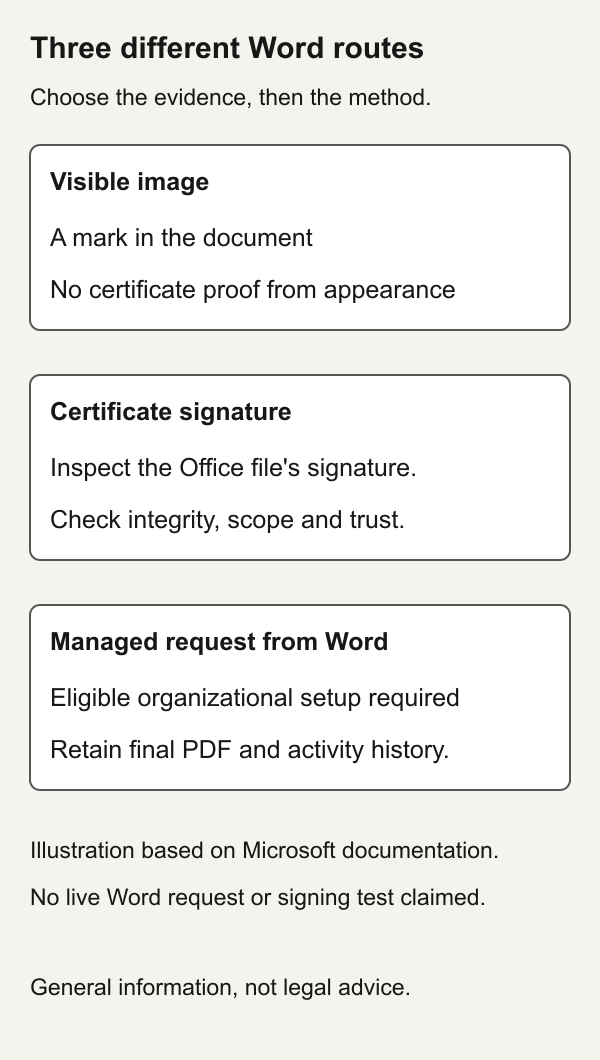
| Your task | Route | What to inspect |
|---|---|---|
| Place your visible mark in a document | Insert a signature image | The exact version and surrounding evidence of assent |
| Sign an Office file with a certificate | Supported desktop signature line or invisible signature | Signature Details, certificate and signed scope |
| Ask defined recipients to sign | Enabled Microsoft 365 eSignature request | The completed PDF and its activity history |
First agree on what the recipient needs. A requested “signed copy” might mean a visible approval mark, a certificate-verifiable Office document, or the final record from a managed request. Writing that requirement explicitly can prevent sending a file that looks right but cannot be reviewed in the expected way. Our digital versus electronic signature comparison demonstrates that appearance and cryptographic evidence are separate questions.
Insert a signature image
Microsoft's current image-signature guide describes scanning your handwritten mark, saving it as an image and inserting it through Insert, Pictures on Windows desktop. Its Mac instructions use Pictures, Picture from File. You can crop the image and save a reusable signature block. This inserts visual content; it does not by itself demonstrate that a certificate signature was applied.
Only use a mark you are authorized to place. Avoid treating possession of someone's image as authority to sign for them. Keep the context that identifies the person, intent and agreed version. A mark copied by a document preparer and a mark deliberately adopted by the signer present different factual questions.
A June 2017 Word 2010 answer recommends AutoText for a scanned-image task rather than the signature-line feature. It is historical guidance for that task, not evidence that today's managed signing option is unavailable. This article's menu guidance comes from current official documentation, not the old version.
Create and sign a desktop signature line
In Microsoft's desktop digital-signature instructions:
- Place the cursor at the intended signing location.
- On Insert, choose Add a Signature Line in the Text group.
- Enter the suggested signer, title, address if needed, and instructions; select OK.
- To complete it, right-click the line and choose Sign, provide the permitted visible representation, then select Sign.
The page distinguishes the unsigned placeholder from signing, which adds a visible representation and a digital signature. It also describes an invisible signature through File, Info, Protect Document, Add a Digital Signature. A digitally signed file becomes read-only to prevent modifications. These are documented desktop procedures; we have not independently tested their dialogs.
A plain underline is another distinct thing. Microsoft's signature-line formatting page describes underlined spaces for print and a table-cell bottom border for an online form. That formatted line is not, by its appearance alone, a certificate signature or a sent request.
Check the certificate and recipient trust
Microsoft's certificate guidance says digitally signing an Office document requires a current digital certificate. It warns that recipients of a self-signed certificate must manually decide whether to trust it. A locally created certificate therefore should not be described as independent identity verification merely because a signature appears.
For an organizational workflow, ask IT which certificate and validation setup the recipient supports. Do not casually instruct a counterparty to trust an unfamiliar certificate just to clear a warning. Establish why the certificate should be trusted and whether it corresponds to the intended signer. Protect the private key; a recipient verification record does not require handing the recipient your signing secret.
Use a managed Microsoft 365 request from Word
Microsoft's Word request guide specifies a subscription desktop version, an unencrypted DOCX in an eSignature-enabled SharePoint site, and supported release channels. It lists Beta, Current and Monthly Enterprise Channels with administrator setup. The documented steps are:
- Open the source from the enabled site in Word desktop.
- Choose Insert, eSignatures fields.
- Add recipients and place their fields; optionally add a message.
- Review the intended document and recipients, then select Create request.
Recipients sign an automatically generated PDF, rather than accessing the source Word file. The completed PDF is stored at the source's SharePoint location and contains activity history. This managed workflow is different from applying a certificate signature directly to a DOCX.
The service overview requires administrator setup and Azure-linked pay-as-you-go billing. Review current costs and organizational sharing requirements before a real request. The page's free-request note ends in June 2026; it is not an October 2026 free offer. We did not enable billing, alter a tenant, purchase a certificate or send a request.
Platform and menu troubleshooting
Record the actual product, platform and release channel when reporting a problem. “Word” alone does not tell a colleague whether you used desktop Windows, Mac, a browser or mobile. An image-insertion path for Mac is not proof that an identical certificate-signing menu exists there. An enabled organizational request also has different prerequisites from a locally stored document.
| Problem | First check | Question to resolve |
|---|---|---|
| A signature image looks right | The required signing method | Was a visible mark the agreed deliverable? |
| The line is still unsigned | Placeholder versus completion | Was the supported signing action actually completed? |
| A certificate warning appears | Signature Details and certificate information | What does the actual status say, and why? |
| Managed request fields are missing | Platform, release channel, enabled site and administrator configuration | Does this environment meet the documented requirements? |
Do not solve a missing control by silently changing the record type. If a recipient requires a certificate-verifiable file, exporting a picture of the document is a different deliverable. Agree on any alternative and verify the file actually returned. For a PDF handoff, use our PDF signing guide.
Inspect the signed file before archiving it
Microsoft's validation instructions describe File, Info, View Signatures; choose a signature's arrow and Signature Details, then View for certificate information. The page distinguishes valid, invalid, recoverable-error and partial-signature states. Altered signed content or a revoked certificate can produce an invalid status; offline access, expiry or issuer trust can produce a recoverable error. A partial signature covers only part of a file.
Record the displayed finding rather than turning every warning into the same conclusion. Preserve the reviewed file and the actual status with its date. If the document changes, recheck the current record instead of relying on an older screenshot. Do not assume that an exported PDF carries the original Word file's certificate evidence; inspect the PDF separately.
A worked handoff: similar appearance, different evidence
This is a fictional comparison scenario, not two files we generated or signed. Imagine a one-page approval with the same visible name, Jordan Demo. In route A the name is an inserted image. In route B it is the visible representation accompanying a certificate signature. The reviewer should ask different verification questions, even if the page appearance is similar.
FICTIONAL REVIEW SCENARIO
Record: DEMO-WORD-1, revision R1
Visible name: Jordan Demo, fictional

Route A: image in an Office document
Certificate status: not established by the image
Next check: intent, authority and agreed version evidence

Route B: certificate-signing scenario
Signature status: inspect in the actual Office file
Next check: validity, signed scope and certificate trust
No successful validation result assumed

Managed-request alternative:
Record to retain: actual final PDF and activity history
Source Word file alone is not the completion record
Before signing, resolve substantive changes in the redline review. After signing, file the retained record with its evidence in the contract repository. Give the next reviewer an exact location rather than a message saying “latest signed copy attached” with several ambiguous attachments.
Copyable checklist
WORD SIGNING HANDOFF
Agreement ID and revision:
Product, platform and channel observed:
Requested method and reason:
Signer, intent and authority checks:
File actually sent or request actually created:
Result received and completion state:
Signature/certificate status, if applicable:
Signed scope and unresolved warnings:
Final record and evidence location:
Reviewer and review date:
Next action:

Fictional preparation entry:
DEMO-WORD-1, R1
Method: awaiting agreement with recipient
Request: none sent
Completion: none claimed
Next action: confirm method and eligible environment
Jurisdiction and legal effect
US E-SIGN recognizes qualifying electronic records and signatures without denying effect solely because they are electronic. It preserves other substantive requirements and includes consumer, retention and scope conditions. Signing intent matters. See 15 USC sections 7001, 7003 and 7006, official 2024 Code edition. A Microsoft feature or certificate status is not a legal conclusion about authority or your agreement's enforceability.
Check applicable state law and document-specific formalities. For agreements governed elsewhere, review that jurisdiction's signature category and form requirements.
FAQs
Does inserting an image create a digital signature?
The inserted image alone does not establish certificate signing. Identify which method was actually used and inspect the relevant record.
Is a signature line already signed?
No. An uncompleted placeholder or formatted line should not be reported as a completed signing action.
Can I request signatures directly from Word?
Microsoft documents a managed option in eligible organizational environments. Use the prerequisites and request steps above; do not assume every Word installation includes it.
Can I create a free digital signature?
Distinguish a free visible mark from certificate availability and recipient trust. The linked certificate guidance discusses self-created certificates and their limitations; the managed service has separate billing requirements.
What if I edit a signed document?
Inspect the current file's signature status and preserve the intended signed version. Do not rely on the earlier appearance or an earlier validation note.
Which file should I keep?
The actual final record for the method used, together with its evidence. For a managed request, that means the completed signing record, not just the editable source.
Banner: AI-generated fictional illustration.
Sources
- Microsoft: inserting a signature image
- Historical Word 2010 image-insertion answer
- Microsoft: desktop digital signatures
- Microsoft: formatted signature lines
- Microsoft: certificates and self-signed trust
- Microsoft Learn: signature requests from Word
- Microsoft Learn: eSignature service prerequisites
- Microsoft: signature and certificate details
- Govinfo: 2024 E-SIGN provisions