

Digital Signature vs Electronic Signature: What Each Proves
By Anirudh Menon, Viaclause editor
Compare electronic signing with cryptographic digital signatures. Actual fictional PDF tests show identical appearance, different integrity and trust evidence.
An electronic signature is the broader signing concept; a digital signature is a cryptographic mechanism for signing data. US ESIGN covers an associated sound, symbol or process adopted with signing intent. A typed name can qualify in context. Certificate-based digital signing adds technical evidence about a signing key and document integrity. The handwritten appearance of a name tells you neither which mechanism was used nor whether the transaction is legally effective.
These definitions follow Official US Code, section 7006 and NIST’s digital-signature terminology. Use our electronic signature guide for the broader evidence and legal framework. Here, an actual local PDF comparison shows what changes when cryptographic signing is added.
Compare the method, not the mark
| Question | Visible electronic signing mark | Certificate-based PDF digital signature |
|---|---|---|
| What appears on the page? | A typed name, drawn mark or image may appear. | The appearance can be similar, different or invisible. |
| What technical evidence exists? | The mark alone contains no certificate-based integrity check. A signing workflow may provide additional logs and tamper evidence. | Embedded signature data can be checked using a public key and certificate; trust and permitted changes need evaluation. |
| What establishes identity? | Consider the authentication and surrounding evidence. | Examine certificate issuance, the trust chain and key control. A certificate name alone is insufficient. |
| What establishes company authority? | Separate evidence of authorization is needed. | Cryptographic validation alone does not establish authority to bind a company. |
| What establishes legal effect? | Applicable law, signing intent and transaction requirements. | The same legal questions remain, including any required signature level or formalities. |
A digital signature uses a private key to produce signing data that can be checked with the corresponding public key. That check supports authenticity and integrity when implemented within the appropriate infrastructure and policy. It does not encrypt the document into secrecy. NIST distinguishes those services from confidentiality protection.
How a certificate-based digital signature works
- Finalize the record. Establish which document or revision is being approved before creating signing data.
- Generate the signature. A signing algorithm uses the private key; commonly, a hash condenses the covered data into a message digest.
- Carry the verification evidence. The recipient needs the corresponding public key. In a certificate-based workflow, a certificate and associated chain help connect that key with its stated subject.
- Validate the result. Check the signature against the covered data, then evaluate certificate trust, relevant time and subsequent changes separately.
NIST FIPS 186-5, explanation and signature-generation framework, describes the private-key/public-key relationship and message digest. This technical standard is not a commercial contract-validity rule. The private key must remain secret; distributing it to everyone who receives the PDF defeats its purpose.
A digital signature, a digital certificate and a visible signature image are three different objects. The signature is computed signing data. The certificate carries a public key and certified subject information. The image is page content. A digital signature can exist without an image, and a signature image can exist without a digital signature, as the PDF signature guide explains. Also distinguish document signing from document encryption: protecting a signature key and protecting a confidential contract’s contents require separate controls.
Actual test: two PDF copies with identical appearance
On October 6, 2026, we created a one-page fictional acknowledgement showing the scripted name “Jordan Demo.” Copy A contains only that visible name. For Copy B, we added an invisible PDF digital signature using pyHanko 0.37.0 and a locally generated, self-signed demonstration certificate. No real person signed, no identity check occurred and no agreement was made.
We reopened both files with the PDF parser and rendered them with Poppler at 100 dpi. The resulting page PNG files had identical SHA-256 hashes. Thus, in this particular test, the two rendered pages were identical even though the PDF files and their signature data differed. The demonstration does not benchmark Acrobat, Docusign or any commercial signing service.
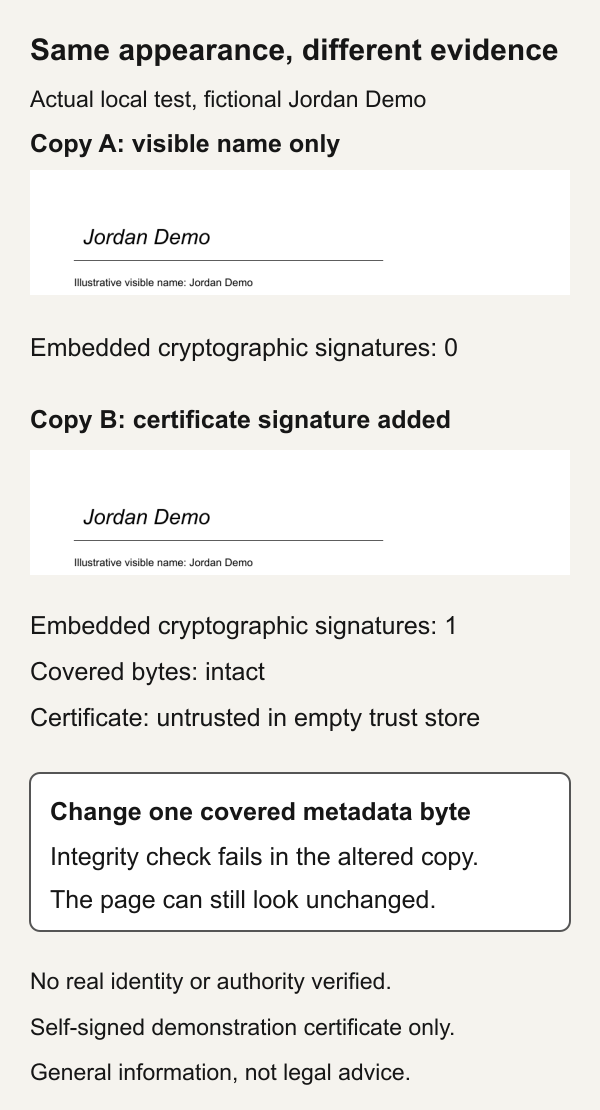
You can inspect the visible-only sample PDF and the certificate-signed sample PDF. Use them as fictional examples only. The certificate is short-lived and self-signed; do not treat it as a production identity credential.
| Local check | Observed result | Meaning and limit |
|---|---|---|
| Copy A, visible-only PDF | Zero embedded PDF cryptographic signatures. | A page mark is present. No certificate-signature validation is available in this file. |
| Copy B, empty trust store | One signature. Covered bytes intact; cryptographic signature valid; certificate untrusted. Overall result false. | Integrity and certificate trust are different checks. |
| Copy B, demo certificate explicitly trusted for the test | Covered bytes intact; cryptographic signature valid; trust accepted; overall result true. | The test deliberately supplied its own trust anchor. It did not verify a real identity. |
| Altered copy of B | Changing one covered metadata byte made the integrity check fail; overall result invalid. | The particular alteration was detected. This does not test every possible PDF modification. |
The altered file changes the first letter of the PDF title metadata from uppercase to lowercase without changing the page’s displayed heading. Inspect the covered-byte alteration sample to see why a document can look unchanged while validation fails. This is a deliberately damaged test copy, not an edited business record.
The test used an explicitly empty trust store first, not the trust settings of your operating system or Acrobat. It performed no online revocation checks, identity verification, signing-authority check or trusted timestamp validation. It recorded no timestamp token. The private key remained in memory and was not written to disk. The retained PDFs, hashes and validation results document this limited technical exercise.
Integrity, trust, time and authority answer different questions
Integrity: do the bytes covered by the signature match the signed data? pyHanko’s validation guide separates this from certificate trust and later updates. PDF signatures can cover an earlier revision, and some later changes may be permitted. Do not reduce validation to “any change invalidates every signature.” Review both the signed revision and subsequent modifications.
Trust: does the recipient accept the certificate’s chain and the basis on which it identifies the signer? A self-signed certificate can produce a mathematically checkable signature without independent identity assurance. Our intentionally configured demo trust shows why the validator’s settings belong in the evidence record.
IETF RFC 5280, section 6, certificate-path validation, treats trust-anchor information, time and acceptable policies as validation inputs. A recipient’s accepted anchors and policies matter; an issuer name or padlock graphic is not a substitute. Record the certificate subject, issuer, chain, validity period, policy and relevant revocation findings or gaps. Ask how the subject’s identity was checked and who controlled the key.
Do not solve an unexpected warning by accepting every certificate. Establish the intended issuer and trust policy through a reliable channel, investigate the warning and retain the outcome. Microsoft’s certificate guidance specifically warns that recipients must decide to trust a self-created certificate before relying on its authenticity. Our demo deliberately changes a test trust input; it does not recommend trusting unknown production credentials.
Time: a displayed date or local signing clock is different from a validated timestamp token. Adobe’s current validation instructions distinguish local-clock time from timestamp-server results and certificate details. Record what was actually validated; do not call every completion date a trusted timestamp.
IETF RFC 3161, introduction and timestamp-authority requirements, describes evidence that data existed before a particular time, using a timestamp authority and a data imprint. This is different from someone typing a date or a computer reporting its own clock. The timestamp’s own signature and trust also need validation. Ask what timestamp and certificate-status evidence remains usable during the planned retention period; a timestamp alone does not establish business authorization.
Authority: even correctly identified people may lack authority for a particular transaction. Check the organization’s authorization evidence and transaction limits separately. A cryptographic status indicator cannot replace that investigation or prove all contract formation requirements.
How to inspect a received PDF
- Keep the received original. Work on a separate copy and record the file hash and source. Printing to PDF or flattening can produce a different file with different signature evidence.
- Use a signature-aware reader. A browser page view can show the visible name without exposing all validation details.
- Inspect every signature and revision. Identify the signed range or version, integrity status, allowed changes and later updates.
- Examine certificate and time details. Record the chain, trust settings, validity information, available revocation evidence and whether a timestamp was validated.
- Check the surrounding signing evidence. Preserve authentication, intent, authority, delivery and completion records rather than relying only on the PDF mark.
For Adobe Acrobat’s documented desktop workflow, open the PDF, select Signatures, then Options and Validate Signatures. Review the status and open Signature Properties and Show Signer’s certificate. Adobe also documents All tools → Use a certificate → Validate all signatures. These are vendor instructions, not steps we tested in Acrobat during this comparison.
Legal terminology: United States, European Union and India
United States: ESIGN section 7001 protects covered interstate or foreign-commerce records from rejection solely for electronic form. It preserves other obligations and generally leaves acceptance voluntary. Statutorily required consumer disclosures trigger specific consent and access conditions; retention and section 7003 exceptions also matter. No certificate is universally prescribed. The official 2024 Code edition was cross-checked against the statutory text hosted by LII, including section 7006's signing-intent definition, during this review. Check applicable state and transaction rules.
European Union: eIDAS article 25 prevents rejection solely for electronic form or lack of qualified status; qualified electronic signatures have handwritten-signature equivalence. Article 26 requires an advanced signature to identify and uniquely link the signer, support sole control with high confidence and detect subsequent changes. Article 3 adds a qualified creation device and qualified certificate for qualified status. A certificate-based PDF is not automatically advanced or qualified. Article 2 preserves contract-validity and form requirements. See the displayed consolidated eIDAS text, articles 2, 3, 25 and 26.
Article 3 also distinguishes a natural person’s signature from a legal person’s electronic seal, which concerns origin and integrity. Ask whose credential appears in the record. Neither a provider’s seal nor a green validation indicator answers every question about an individual’s assent or authority.
India: the Information Technology Act’s section 2(ta) defines electronic signature through specified electronic techniques and includes digital signature. Section 3 describes asymmetric cryptography and a hash function; section 3A addresses reliable electronic-authentication techniques and the Second Schedule. Section 5’s recognition of legally required signatures depends on the prescribed manner. Read the official Act, sections 2, 3, 3A and 5, and check applicable rules, schedules and transaction exclusions. Do not import the US typed-name definition into an Indian statutory-signature requirement.
Choose a method and retain the evidence
First identify the document’s jurisdiction, required form, recipient requirements and risk. Then decide whether the workflow needs an embedded certificate signature, a specified trust service, stronger authentication, a validated timestamp or additional evidence retention. Ask the recipient which certificate and validation settings they accept before signing. A purchase decision should compare electronic signature software against those needs.
If you only need instructions for placing and saving a visible mark, see how to sign a PDF. If the transaction requires an Indian eSign route, use the jurisdiction-specific Aadhaar eSign guide. Neither appearance nor a generic provider label establishes compliance across countries.
SIGNATURE EVIDENCE RECORD, FICTIONAL TEST
Document: DEMO1, one-page acknowledgement
Visible name: Jordan Demo, scripted illustration
Copy A: no embedded cryptographic signature
Copy B: one certificate-based PDF signature
Integrity: intact before deliberate alteration
Trust context: empty store, then demo certificate explicitly trusted
Identity assurance: none, locally generated self-signed certificate
Trusted timestamp: none
Online revocation check: not performed
Signing authority and legal effect: not assessed
Retention: original PDFs, file hashes and dated validation results
Retain originals and evidence together in the contract repository. An exported screenshot of “Jordan Demo” preserves the appearance; it does not preserve the embedded signature or its validation context.
How to create the intended kind of signature
For an ordinary electronic-signing workflow, prepare the final document, identify recipients and their roles, place the required fields, choose authentication, let each recipient review and adopt the signing action, and export the completed record with its evidence. Typing, drawing or uploading an image chooses an appearance. Confirm separately whether the workflow adds an embedded digital signature, whose key signs it and what recipient validation will show.
For a certificate workflow, arrange an accepted certificate or supported remote signing service, protect access to its key, select the appropriate signing field and approve the final version. Validate an exported sample using the recipient’s actual policy before rolling out the process. These are implementation checks, not a claim that we tested a commercial service.
Microsoft Word or Excel desktop: Microsoft documents Insert → Add a Signature Line, entering signer details, then right-clicking the line and choosing Sign. Its signature-line signing process adds both a visible representation and a digital signature. This differs from simply inserting a signature image into a document. See Microsoft’s supported desktop signing instructions; choose the certificate and recipient trust arrangements intentionally.
Adobe Acrobat Sign: its digital-signature configuration guide describes local certificate and cloud-signature options, with provider choices controlled by account configuration. Confirm the enabled route and recipient prerequisites before sending. A mobile or browser workflow can differ from a desktop certificate workflow; the product’s name does not resolve that choice.
Benefits, tradeoffs and a practical selection matrix
Electronic workflows can reduce printing, routing and filing work. Their usefulness depends on recipients completing the steps and the business retaining a reliable record. A certificate signature adds independently inspectable cryptographic evidence, but also introduces issuer, key-access, trust, certificate-status and long-term validation questions. Neither approach eliminates poor recipient authentication, unauthorized signing or an unsuitable document form.
| Business situation | Proposed approach to evaluate | Evidence needed before choosing |
|---|---|---|
| Routine commercial acknowledgement, no specified certificate requirement identified | Electronic workflow with deliberate assent and proportionate authentication | Applicable form rules, agreed acceptance, identified version, recipient authentication and exportable completion history |
| Recipient requires a certificate-signed PDF | Certificate workflow using the recipient’s accepted issuer and validation policy | Whose certificate signs, key protection, trust chain, certificate-status evidence, signed revision and any timestamp |
| A reviewer identifies a legally required signature level or prescribed national route | That specifically identified route, after checking the document category | Exact requirement, provider and device qualifications where relevant, recipient acceptance and retained verification evidence |
| High consequence record expected to be disputed or retained for years | Stronger identity and authority checks plus a planned evidence package | Final terms, role approval, signing evidence, independent verification, timestamp needs and retention validation plan |
This matrix is an original evaluation aid. It sets questions, not legal safe harbors or a claim that every low-value record needs the same technology. Before purchasing, request a completed sample and evidence export for the exact proposed workflow. Compare onboarding effort, unsupported recipients, failure handling, accessible signing, evidence access after termination and the quoted cost of the required configuration. No prices or performance savings are assumed here.
Completed business example: identity and authority still need records
Assume fictional Cedar Labs wants an authorized buyer to accept a $45,000 service order. Its internal policy gives that buyer a $50,000 approval limit, and the reviewer has checked the applicable form requirements for this example. The amount is $5,000 below the policy limit. That arithmetic does not establish authority: Cedar must also check that the limit covers this service category and that the authority is current.
If the buyer types a name in an agreed workflow, Cedar should connect the signing event with the reviewed version, authentication and approval record. If a certificate signature is added, Cedar should also inspect the certificate subject and trust results. The certificate does not amend the approval limit. If the order changes to $55,000, it exceeds the assumed limit by $5,000; escalate before signing even if technical validation is successful.
COMPLETED WORKFLOW DECISION, FICTIONAL EXAMPLE
Organization: Cedar Labs
Record: service order CL-204, version 3
Amount: USD 45,000
Policy assumption: buyer may approve this category up to USD 50,000
Authority evidence: current delegation and category approval attached
Legal-form review: completed for this hypothetical, result recorded separately
Recipient requirement: ordinary electronic signing accepted for this example
Selected route: authenticated account, final-version review, deliberate signing action
Certificate requirement: none identified in the assumed review
Evidence to retain: final record, authentication event, assent and completion log,
approval record, delivery record and original exported file
Escalation: changed terms, authentication failure or amount above USD 50,000
Status: fictional planning example; no signature event or vendor test performed
Checklist
[ ] Identify document category, jurisdiction, signing intent and required form.
[ ] Name the recipient’s accepted workflow and certificate policy, if any.
[ ] Confirm whether the method creates embedded cryptographic evidence.
[ ] Preserve the received PDF before conversion or editing.
[ ] Validate covered bytes and inspect later revisions.
[ ] Record certificate trust settings and identity assurance.
[ ] Distinguish local time from a validated timestamp.
[ ] Check authority separately from identity.
[ ] Retain workflow evidence and validation results with the final version.
[ ] Check accessible signing and export before committing to a provider.
[ ] Assign an owner for retention, certificate-status evidence and later verification.
[ ] Confirm recipient acceptance and jurisdiction-specific formalities.
Frequently asked questions
Is typing a name a digital signature?
Typing a name with signing intent can qualify under the US definition. The mark alone does not establish cryptographic signing; inspect the workflow evidence.
Is Docusign electronic or digital signing?
The provider offers electronic signing and certificate-based digital-signature options. Ask which workflow was used and inspect the resulting evidence; Docusign’s own comparison describes both. The brand name alone does not classify the particular file.
Does a digital signature have to be visible?
No. Our certificate-signed example uses an invisible signature field alongside an existing visible name. pyHanko documents both visible and invisible PDF signatures.
Does an untrusted certificate mean the bytes were changed?
Not necessarily. Our unaltered certificate file passed integrity checks while remaining untrusted in an empty trust store. Investigate each status separately.
Does a valid digital signature prove company authority?
No. It does not by itself establish that the signer was authorized for that transaction. Retain and evaluate authority evidence separately.
Can we print the signed PDF and keep only that copy?
A printout cannot carry the original embedded cryptographic signature data. Preserve the original file and its evidence when those are relevant to verification or retention requirements.
Does digital signing encrypt the contract?
No. Signature verification and confidentiality are different services. A signed document may remain readable to anyone who obtains it. Control storage, sharing and encryption separately.
Is every certificate-signed PDF an EU qualified electronic signature?
No. Qualified status requires the specific advanced-signature, qualified-device and qualified-certificate criteria described above.
Can an ordinary electronic signature have useful audit evidence?
Yes. Ask for the final version, authentication, signing action and completion records for the actual workflow. An image by itself reveals little; additional evidence must be assessed on its own merits.
Does an expired certificate always mean the document was altered?
No. Certificate validity, timestamp evidence, trust policy and covered-byte integrity are separate questions, consistent with certificate-path validation. Investigate the recorded status and relevant time rather than treating expiry as proof of editing.
What happens when another signature is added later?
A PDF may contain successive signed revisions. Review the earlier signature’s covered revision and whether subsequent changes are permitted. Do not assume the last visible name authenticates every earlier signing event.
Can the signer never deny a digital signature?
Cryptographic evidence can help investigate attribution and integrity. It does not eliminate questions about key compromise, intent, identity verification, authority or applicable law. Avoid promising that technical validation makes every dispute impossible.
Prepared by the Viaclause editorial team. The fictional PDF experiment was performed locally with scripted samples and a demonstration certificate. No real identity or transaction was verified. The business example is illustrative, not a performed transaction or vendor test. The banner is an AI-generated fictional documentary illustration.
Sources
ESIGN section 7001 at LII, section 7003 exceptions and section 7006 definitions: statutory text cross-checked October 6, 2026; these are provisions of one instrument, not three independent laws.
- Official 2024 US Code, ESIGN sections 7001, 7003 and 7006.
- NIST digital signature glossary, with identified technical source contexts.
- Displayed consolidated eIDAS text, articles 2, 3, 25 and 26.
- Adobe Acrobat, digital-signature validation instructions.
- pyHanko, validating PDF signatures.
- pyHanko, signing PDF files and invisible signature fields.
- Docusign, electronic and digital-signature comparison.
- Viaclause fictional test artifact, visible-only PDF.
- Viaclause fictional test artifact, certificate-signed PDF.
- Viaclause fictional test artifact, deliberate covered-byte alteration.
- NIST FIPS 186-5, Digital Signature Standard.
- IETF RFC 5280, certificate-path validation.
- IETF RFC 3161, timestamp protocol.
- India Information Technology Act, sections 2, 3, 3A and 5.
- Adobe Acrobat Sign, digital-signature configuration.
- Microsoft, desktop digital signatures.
- Microsoft, obtaining or creating a certificate.