

Electronic Signature Software: A Practical Evaluation Checklist
By Anirudh Menon, Viaclause editor
Evaluate electronic signature software with dated plan examples, a two-sender workload, failed-request tests and a copyable evidence and export checklist.
Electronic signature software prepares documents, routes them to signers, records signing activity and returns completed files. Choose it by the workflow you need to prove: the correct version reached the right person, required approvals happened, failures were handled, and the final evidence can be retrieved after the sender leaves.
Start with the electronic signature guide for the legal concept. This page addresses the software purchase: a dated price comparison, a worked capacity example and a pilot you can repeat. The shortlist is based on public documentation, not hands-on service testing or a complete-market ranking.
Choose the workflow before the brand
A visible signature mark, a request sent to several people and a certificate-based signature are different requirements. For a single file, use the PDF signing and saved-copy guide. For a team, write down the complete route before comparing subscriptions.
- Occasional self-signing: your own mark on a document, a saved copy and the recipient's acceptance of that method.
- Routine business requests: named senders, templates, signing order, reminders, correction handling and a retained completion record.
- Controlled organizational signing: defined authentication, approval authority, permissions, integrations, retention rules and an independently usable export.
Give vendors the same document packet and the same recipient roles. A demonstration with one internal signer cannot answer whether an external customer can complete your actual process. Record requirements as conditions: “A replacement sender can retrieve the final packet after the original sender's access is removed,” rather than “good administration.”
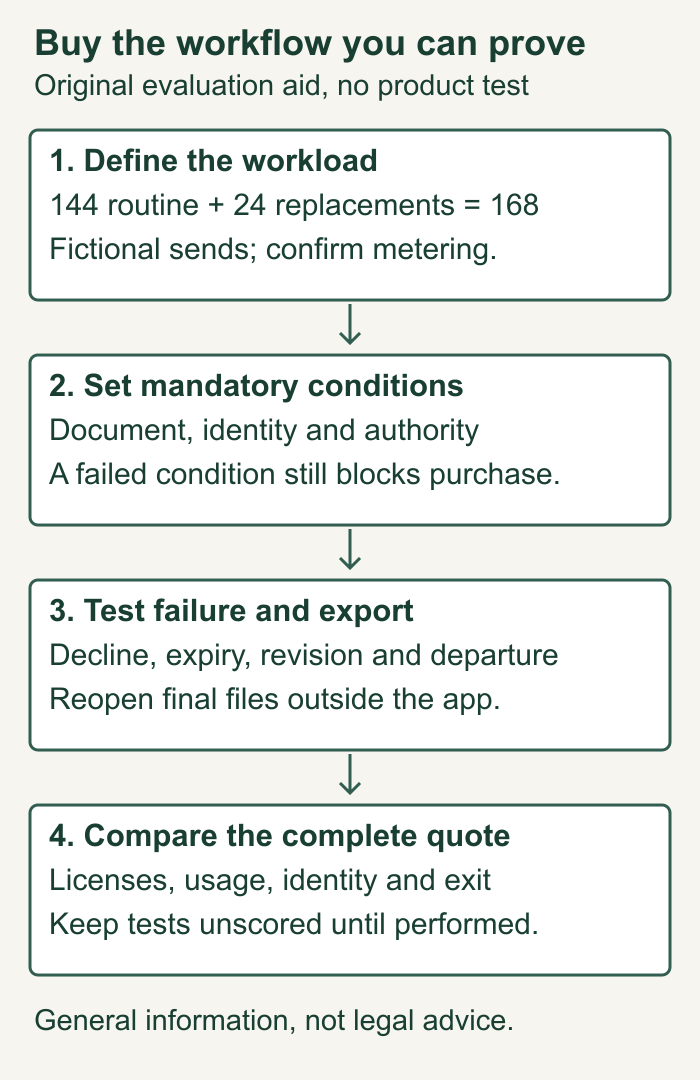
A documented shortlist: match the purchase to the job
Compare the exact edition and configuration, not just the provider name. These seven candidates illustrate distinct buying questions. Features below are documented by their providers on October 6, 2026; we have not operated the products. A documented capability still needs a plan entitlement, configured demonstration and usable evidence before it becomes a passed requirement.
| Candidate and reason to investigate | Officially documented capability | Limitation or question to resolve |
|---|---|---|
| Docusign eSignature: recurring team requests | Its plan comparison lists templates, audit trails and completion certificates; Standard adds shared templates and user permissions | Annual sender allowances need allocation checks. SSO and data residency are contact-sales items, not assumed Standard entitlements. Official plan comparison |
| Adobe Acrobat Pro for teams: PDF preparation and signature requests together | Adobe distinguishes PDF editing with signature requests from its comprehensive Sign Solutions product | Acrobat Pro does not include every Sign Solutions capability. Audit-report configuration controls are limited to Sign Solutions and Sign for Government. Product distinctions; audit-report availability |
| Dropbox Sign: investigate a separate signed-file evidence packet | The transaction trail can be appended or returned as a separate file; it includes an identifier and PDF hash | The Just Me self-signing option does not include an audit trail. Test the actual request workflow you will buy. Official audit-trail guide |
| PandaDoc: prepare proposals and collect signatures in one route | Its product page documents a document editor, reusable templates and multiple signers with a designated order | Confirm which edition includes the required preparation and approval workflow. Its separate classic audit guide describes CSV activity export but uses both Starter and Essentials terminology. Official product features; classic audit guide |
| SignWell: straightforward sending and recipient controls | Its help guide documents sending order, automatic reminders, completion notifications and optional recipient reassignment | Reassignment settings matter for authority-sensitive documents. A completion email can contain a file or only a link depending on settings. Official notification and reassignment guide |
| Jotform Sign: forms, approvals and document collection together | Its product page describes reusable documents, approval flows, cloud-storage connections, delegation and audit trails | Test whether a public link or delegated signer suits your named-recipient requirement; obtain team and storage entitlements for the exact plan. Official Sign features |
| Zoho Sign: investigate authentication and certificate-based signing | Its security documentation describes user MFA, role-based access, audit trails and certificate authorities associated with data centers | User-account MFA is different from your external signer's required authentication. Ask which identity and certificate options your country, plan and recipient can use. Official product security documentation |
For a freelancer: decide whether a signed proposal should create a project, request a deposit or merely return a PDF. An existing business platform with built-in signing may reduce duplicate data entry, but evaluate its approvals, evidence and exit process with the same packet. For a procurement or legal team, add ownership transfer, access controls and independent retrieval. For developers, add production API rights and event-delivery recovery. None of those choices establishes measured savings.
Ask the supplier to demonstrate the exact connection to your CRM, project system or repository. A list of integration logos does not show whether your required fields, document versions, permissions and completion events reach the destination. Keep recipient convenience, mobile use, accessibility, support and administrator effort in the evaluation even when a provider has a familiar name.
What current advertised plans actually say
The following US-dollar rates were inspected on official pages on October 6, 2026. They are advertised annual commitments billed monthly, before applicable tax. Checkout, region, add-ons and your signed order can change the amount. Monthly installments do not establish a month-to-month cancellation right.
| Advertised plan | Monthly rate | Displayed allowance or important distinction | Annual subscription floor |
|---|---|---|---|
| Docusign Personal | $11 | Single user; five envelopes per month | $132 for one sender; not the two-sender example |
| Docusign Standard | $30 per user | 100 envelopes per user per year | $720 for two users |
| Docusign Business Pro | $45 per user | 100 envelopes per user per year | $1,080 for two users |
| Adobe Acrobat Standard for teams | US$16.99 per license | PDF software with signature requests; confirm capacity for your workload | US$407.76 for two licenses |
| Adobe Acrobat Pro for teams | US$23.99 per license | Not the separate Acrobat Sign Solutions enterprise offering | US$575.76 for two licenses |
Sources: Docusign's official eSignature pricing and FAQ and Adobe's official business plans. Annual floors are our arithmetic: rate × 12 × licenses. These rows are not equivalent feature bundles. Adobe's page distinguishes its enterprise Sign Solutions offering from Acrobat; obtain the appropriate quote rather than assuming the desktop plan includes it.
For example, the two-license Pro calculation is 23.99 × 12 × 2 = 575.76. That number excludes any separately quoted identity checks, implementation, integration, excess usage or migration. A cheaper floor cannot settle a missing authentication or export requirement. Do not use a product roundup's “unlimited” label in place of your specific plan's current terms.
For a permanent free-plan comparison, SignWell's official page currently states one sender, one template and three documents a month. Its paid Light and Business cards advertise unlimited documents, but API usage has separate allowances. The extracted feature list contains entries for multiple tiers, so do not infer that every listed control is available on Free. SignWell's current pricing and API allowance comparison. One sender and three monthly documents do not accommodate the fictional two-sender, twelve-routine-packet monthly workload here.
A free trial is useful for testing a purchased configuration; its bonus checks, temporary entitlements or trial quota are not a continuing subscription allowance. Compare renewal rates, minimum sender commitments, billing term, cancellation conditions, any fair-use or automated-send terms, paid support, identity attempts, SMS delivery and exit charges in the written order.
Worked example: count requests, not signature boxes
Fictional workload: Sender A issues eight routine packets each month; Sender B issues four. Each packet contains an agreement and an annex, with two external signers and one internal countersigner. The buyer also budgets 24 separately issued replacement packets per year. These are explicit planning inputs, not measured failure rates.
Docusign counts an envelope containing one or more files or signers once when sent, even if incomplete. Do not multiply quota usage by three signers; confirm replacement treatment in the order. Docusign envelope definition and allowance FAQ.
| Planning item | Calculation | Result | Question for the quote |
|---|---|---|---|
| A's routine packets | 8 × 12 | 96 per year | Which sender and account limits apply? |
| B's routine packets | 4 × 12 | 48 per year | Can unused allowance be shared? |
| Routine total | 96 + 48 | 144 per year | Does an integration use a separate allowance? |
| Separately issued replacements | 144 + 24 | 168 planned sends | How are voids, declines, expiry, corrections and new sends metered? |
| If A sends every replacement | 96 + 24 | A sends 120; B sends 48 | Does the quote permit this allocation? |
The advertised two-user allowance is nominally 2 × 100 = 200 per year. That arithmetic alone does not establish pooling, per-sender allocation, automated-send rights or the price of excess sends. Ask for written confirmation. A correction within the original request and a new replacement request are different events; the pilot must record which happened.
Completed planning record, fictional: the procurement owner has approved a budget model using 168 sends and two named senders. Capacity remains “unconfirmed” until the quote resolves A's 120-send allocation and replacement rules. No vendor has passed the pilot. The proper decision at this stage is to request clarification, not to announce that a 200-send headline proves fit.
Run the same pilot against every shortlisted plan
Use fictional documents and authorized test recipients. Save the plan name, quoted terms, settings, document version and test date. Leave the result blank until someone performs the step; a sales statement belongs in a separate “vendor says” field.
| Test | Action | Evidence to retain | Your pass condition |
|---|---|---|---|
| Normal completion | Route packet R1 to two external signers, then the authorized countersigner | Final files, recipient events, method and timestamps | All required people completed the correct packet in the required order |
| Wrong recipient | Use an authorized test address representing a mistaken recipient | Correction or cancellation history and replacement ID | Old access is handled as required; new recipient gets the intended version |
| Decline and expiry | Run separate declined and deliberately expired requests | Status history, reminder settings and usage report | No incomplete request is filed as an executed agreement |
| Changed document | Replace R1 with R2 using the provider's permitted procedure | Version identifiers and evidence of any required renewed signing | Each retained signature can be related to the document actually accepted |
| Sender departure | Apply the agreed access-removal process to a test sender | Successor access, permissions and retrieved packet | Authorized colleagues retain the required records |
| Export and integration | Export the packet and replay a completion event in a test integration | Readable files, linked evidence, destination record and duplicate handling | One completed agreement reaches the right record without lost evidence or duplicate work |
For the export test, open the downloaded files outside the signing application. Check page count, annexes, signatures and the relationship between the document and its activity record. A certificate or audit trail may be useful evidence; its presence does not itself prove authority or make every agreement enforceable.
Store the complete packet using the contract repository record and retrieval test. Before cancelling a service, repeat the SaaS export check before access ends, including any restricted records and the provider's deletion timetable.
Evidence, security and integration checks that a feature label misses
Separate account security, signer identity and authority
A sender's MFA, a recipient access code and a certificate-based signature answer different questions. For example, Zoho documents a second authentication level for user accounts and lists digital-signature certificate authorities by data center. That does not identify which external signer authenticated in your packet or who authorized them to bind a company. Zoho's account authentication and signing architecture. Put the actual required recipient method and authority approval in the test record.
Ask what happens when an email is forwarded, a signer changes their phone, someone delegates a request, or a sender selects the wrong contact. Test correction and reassignment under your chosen settings. Decide which documents need stronger identity proof before requesting a quote; repeated paid identity attempts belong in the cost model.
Inspect the exported packet and its settings
Adobe documents downloadable audit reports across its service tiers, while broader configuration controls are restricted to Sign Solutions and Sign for Government. Inspect what your edition actually records. Adobe's audit-report settings and tier limits. Dropbox's separate-file option and PandaDoc's classic CSV activity export illustrate why a single “audit trail” checkbox cannot specify the format your repository receives.
Ask the provider to identify event types, time zone, request ID, participant identifiers, authentication results and document linkage in a sample export. Reopen the signed PDF and every annex. Check whether failed, canceled and expired requests have retrievable records too. A document activity CSV, an administrator account log and a completion certificate are different artifacts; ask for the ones your records policy needs.
Prove the handoff after signing
Docusign's developer guide documents failed Connect publish logs and programmatic retry of webhook calls. This is a documented recovery mechanism, not proof that a retail plan includes your production integration. Docusign's Connect failure-log and retry guide.
In your test environment, interrupt the destination, restore it, replay the event through the supported procedure and compare the source request with the destination record. Check that a retry neither creates a second project nor issues a duplicate invoice. Save the event and agreement identifiers, error, recovery action and final reconciled record. Validate authentication of incoming events and permissions on the destination. Request API, sandbox, connector and middleware charges separately.
Check administration, accessibility and exit
Use named accounts and the least access each role needs. Demonstrate onboarding, permission changes, template ownership and sender departure without depending on a departed employee's personal mailbox. Record who can download, delete or share an agreement, and what happens to historical records when a license is removed.
For sensitive files, request the applicable processing terms, subprocessors, hosting locations, retention rules, backup deletion, breach-notification terms and current security or accessibility reports. Check their product, region and date scope. A marketing badge is not the underlying report or a guarantee that your use meets every law.
Include a signer using a phone, keyboard navigation and assistive technology appropriate to your audience. Check fields, error messages, consent screens and downloadable copies. Ask for the supported browser and device list, escalation route, support hours and promised response terms. A demonstration should fit the recipient's actual conditions, including a fallback for someone who cannot complete the electronic route.
Schedule an exit rehearsal before renewal: export a completed packet and its history, retrieve records owned by another sender, document deletion timing and preserve anything subject to your retention or dispute hold. Assign an owner to each gap rather than leaving a “security approved” label with no evidence.
Copyable evaluation record
Use one record per plan. A must-pass failure remains a failure even when the weighted comparison looks attractive.
Plan and region: [ ]
Official price checked on: [date and URL]
Written quote / order reference: [ ]
Named senders and roles: [ ]
Routine sends / replacement sends: [ ] / [ ]
Metering unit, pooling and overage: [confirmed terms]
Authentication requirement: [ ]
Mandatory approval and authority checks: [ ]
Completion evidence and export format: [ ]
Retention, access removal and deletion: [ ]
Test document versions and request IDs: [ ]
Tests performed by / on: [ ] / [ ]
Observed result: [pass / fail / not run]
Vendor statements not yet verified: [ ]
Unresolved questions / owner / deadline: [ ]
Full annual cost / assumptions: [ ]
Decision and reason: [ ]
For candidates that pass the mandatory checks, a buyer might choose these illustrative weights: recipient workflow 25, evidence and export 25, administration 20, integration 15 and total cost 15, totaling 100. Rate each category from zero to five using recorded evidence, then calculate weight × rating ÷ 5. These are proposed buyer preferences, not research findings or provider scores. Agree them before demonstrations.
Calculate implementation effort and ongoing administration separately. Use the CLM business case without imaginary savings to avoid counting a hypothetical time reduction as an observed financial return. Buying signatures also does not establish the broader approval, negotiation and obligation workflows described in contract lifecycle management.
Completed vendor evaluation: a defensible shortlist without invented tests
Fictional planning case, not a customer pilot: Cedar Studio needs two senders and 168 separately issued packets per year. It prepares PDFs already, does not require SSO for this small-team case, and makes ownership transfer, correct signing order and export mandatory. The procurement owner records public facts separately from outstanding supplier answers.
| Candidate | Documented fact used in this example | Unresolved requirement | Planning decision |
|---|---|---|---|
| Docusign Standard | Two-user annual subscription floor is $720; displayed annual allowance is 100 per user | A's 120-send allocation, any pooling and excess rate; actual export and departure tests | Request written capacity terms before conducting the pilot |
| Acrobat Pro for teams | Two-license annual subscription floor is $575.76; this is the Acrobat product, not Sign Solutions | Exact request allowance, required recipient setup, export contents and ownership transfer for this configuration | Shortlist for a configured PDF-and-signature demonstration |
| SignWell Free | One sender and three documents per month are advertised | No pilot is needed to establish that those displayed limits fail this case's two-sender workload | Exclude Free from this case; a paid edition would be a separate candidate |
Those price and allowance facts come from the official pages linked above. The decision does not claim Adobe wins on features, Docusign lacks capacity, or SignWell's paid plans fail. The buyer has insufficient evidence to purchase either remaining candidate. That is a completed evaluation decision at the documentation stage, not a blank worksheet or a made-up test result.
Budget sensitivity: assume, solely for planning, $200 of implementation, $120 for identity and communication, and $80 for usage or export uncertainty, totaling a $400 reserve. Adding the same reserve gives $720 + $400 = $1,120 for Standard and $575.76 + $400 = $975.76 for Pro. These are provisional budgets before tax, not provider quotes or estimates of actual extras. The $144.24 subscription difference does not resolve either candidate's mandatory gaps. Replace every reserve with confirmed terms before committing.
Completed planning record, fictional
Buyer: Cedar Studio
Candidate: Docusign Standard, US advertised annual plan
Public price observation: October 6, 2026
Sender A: 96 routine + 24 replacements = 120
Sender B: 48 routine; total = 168
Subscription floor: 30 x 12 x 2 = USD 720
Planning reserve: USD 400, assumption only
Provisional first-year budget: USD 1,120 before tax
Authority: approved company contacts and internal countersigner
Required records: final PDF and annex, linked completion history
Capacity confirmation: not obtained
Pilot execution: not run
Weighted product score: unassigned
Question owner: procurement lead
Next action: obtain allocation and overage terms, then run packet R1
Decision: hold purchase until all mandatory checks pass
After real pilot evidence exists, the illustrative 100-point weights above can be calculated. For a pure arithmetic example unrelated to any named vendor, ratings of 4, 5, 4, 3 and 4 give 20 + 25 + 16 + 9 + 12 = 82. A second hypothetical candidate with 5, 4, 3, 4 and 5 gives 25 + 20 + 12 + 12 + 15 = 84. These are invented inputs showing the formula, not service ratings. If the second candidate fails a mandatory export condition, its higher number cannot make it eligible. Keep actual unrun tests unscored.
US legal scope and jurisdiction checks
For covered interstate or foreign commerce, E-SIGN generally prevents denial of legal effect solely because a record or signature is electronic. It preserves other substantive requirements and generally does not force a person to accept electronic records. Its consumer-disclosure rules apply when specified legally required written information is provided electronically. Required retained records must meet accuracy and accessibility conditions; a reproducible file matters. 15 USC 7001(a), (b), (c), (d) and (e).
The statute lists exceptions, including certain wills, family-law records, court documents and notices. Check the exact transaction before applying the general rule. 15 USC 7003. Ask counsel about governing state law, authority, consumer notices, notarization and any filing-specific requirements. Other countries and cross-border transactions need their own document-specific analysis.
EU transactions: eIDAS Article 25 protects an electronic signature from rejection solely for being electronic or nonqualified; a qualified electronic signature has the equivalent legal effect of a handwritten signature. Article 26 sets additional requirements for advanced signatures, including signer linkage, identification, control and detectable changes. Article 2(3) preserves national and EU rules on contract validity and form. A provider's completion certificate is not automatically a qualified signature. Specify the necessary service and validation evidence. eIDAS consolidated text, Articles 2, 25 and 26.
For UK, Indian or other transactions, obtain the governing local rules for the actual document class and intended filing or enforcement route. Do not transfer the US or EU conclusions to another country or treat the availability of a product there as proof of legal suitability.
Turn that analysis into purchase conditions: required signing method, permitted recipients, approval steps, records to preserve and any document classes excluded from the routine workflow. A vendor's compliance label cannot answer whether your particular transaction satisfies those conditions.
Frequently asked questions
What is the best electronic signature software?
The best fit is the plan that passes your mandatory workflow, identity, evidence and export checks at an acceptable complete cost. This guide gives a common test, not a universal winner.
What is the best free option?
No free-plan winner is established here. SignWell Free is a documented example with one sender and three monthly documents, which fails the worked team workload above. First distinguish signing a file yourself from repeatedly sending requests to other people. Check current limits, usable exports and the upgrade terms for your exact workload. A free trial is not a permanent free team plan. This guide has not tested or scored free services.
Is Docusign free for the signer? Does the recipient need an account?
Docusign describes signing and returning documents as free. Its recipient FAQ says a received request can be completed without an account; sending capacity is a separate purchase question. Docusign's individual signing FAQ. Confirm any special authentication setup in your pilot.
Which alternatives should I evaluate?
Consider a dedicated signing service, a PDF tool with signature requests and a signing feature inside your existing workflow platform. Apply the same tests and obtain current official terms. The Adobe and Docusign examples above illustrate different purchases; they do not establish that those are the only credible choices.
What evidence should we retain?
Define the packet with counsel and your records owner: final document and annexes, request identifier, relevant completion and authentication events, consent records where required, authority approvals, and a link to later amendments. Confirm that exports preserve the necessary relationships.
Do declined or expired requests still consume capacity?
Read the plan's metering rule rather than counting only signed agreements. In the example above, every separately issued replacement is budgeted as another send. Do not assume another provider uses the same unit or treatment.
How is an electronic signature different from a digital signature?
For software selection, separate a signing action from the cryptographic process that helps associate a signature with document data. Zoho's technical description, for example, uses public-key infrastructure and document hashes. Neither a visible mark nor a provider certificate alone tells you that a particular transaction uses the EU qualified-signature method. See the jurisdiction checks above.
Does an audit trail prove that someone could bind the company?
It records specified events; it does not replace your authority check. Retain the approving person's role and the approved document version. Review delegation settings and require confirmation when a recipient is substituted.
Should we buy a dedicated service or signing inside a business platform?
Use a dedicated service when its configured workflow meets the requirement and the handoff works. Compare an integrated platform when proposal preparation, project creation or invoicing is part of the job. Test both routes from approved version through the destination record and independently usable export.
Can we use mobile signing for customers?
Test the actual document, required identity method, consent step and saved copy on the supported device. Include accessibility and a fallback route. A mobile-capability label does not show whether your long annex or required fields remain usable.
Does unlimited signing include unlimited API usage?
Do not assume it. SignWell's page advertises unlimited documents on paid cards while separately showing API document allowances and usage pricing. Confirm whether your browser requests, bulk sends and production API calls use the same purchased unit. SignWell's signing and API comparison.
What happens when the sender leaves or we cancel the subscription?
Apply your documented transfer process and reopen the final files and history under the successor's access. Agree who preserves records, when access ends and what the provider deletes. Run that check before departure or cancellation instead of discovering missing evidence afterward.
Purchase checklist
- Document classes, jurisdictions and mandatory signing methods are defined.
- Named senders, recipients and approval authority are recorded.
- Capacity includes separately issued replacements and the busiest sender.
- The written quote resolves pooling, automated sends, excess usage and add-ons.
- Decline, expiry, correction and changed-version tests have actual results.
- Completed packets and evidence are usable outside the service.
- Access transfer, retention and exit responsibilities have owners.
- Cost comparisons use the same term, taxes, workload and implementation assumptions.
- Any “not run” mandatory test is resolved before the buying decision.
Sources
- Docusign: official eSignature prices, allowances and FAQ, inspected October 6, 2026.
- Adobe: official Acrobat business pricing and product distinctions, inspected October 6, 2026.
- Docusign: individual signing and account FAQ.
- 15 USC 7001: validity, consumer disclosures and retention, official 2024 Code edition.
- 15 USC 7003: specified exceptions, official 2024 Code edition.
- PandaDoc: document editor, templates and designated signing order, inspected October 6, 2026.
- Adobe: audit-report content, download and tier-specific settings, inspected October 6, 2026.
- Dropbox: audit-trail identifiers, hashes, separation and self-signing exception, inspected October 6, 2026.
- PandaDoc: classic-experience document activity and CSV export, inspected October 6, 2026.
- Zoho: user MFA, signing architecture and certificate authorities, inspected October 6, 2026.
- SignWell: notifications, sending order, reminders and reassignment settings, inspected October 6, 2026.
- SignWell: free-plan limits and separately stated API allowances, inspected October 6, 2026.
- Jotform: reusable documents, approvals, storage links, delegation and audit trails, inspected October 6, 2026.
- Docusign: Connect failed publishes and retry mechanism, inspected October 6, 2026.
- EU: current eIDAS consolidated text, document form and signature levels, inspected October 6, 2026.
Published by Viaclause with AI assistance. Provider links go directly to official pages without affiliate referral parameters. The banner is an AI-generated illustration of fictional people. Workloads and decision records below are fictional planning examples, not customer results.